Atlisco Insights
Amazon catalog to Google Shopping: complete 2026 feed workflow
Build an amazon catalog to google shopping feed for your own storefront. Map identifiers, validate landing pages, and prevent catalog sync errors.
Published November 20, 2026

Instead of manually rebuilding Amazon listings for Google Shopping, map your catalog into a feed that points to product pages on your own verified storefront. An amazon catalog to google shopping feed is a data-reuse workflow, not a way to submit Amazon detail pages through your own Merchant Center account.
- An amazon catalog to google shopping feed needs your own eligible storefront, not Amazon product-page destinations.
- Reuse verified product identifiers and owned content; rebuild destination links and channel-specific offer fields.
- Atlisco supports established Amazon brands through PPC management, listing SEO, and growth partnerships—not a stated feed connector.
- Validate Merchant Center product eligibility before activating Google Shopping campaigns.
Why this matters
Your Amazon catalog describes products. Google Merchant Center also needs an eligible selling website, matching landing pages, and accurate merchant information. Copying an export does not establish those requirements.
For your 2026 setup, separate reusable product facts from channel-specific selling data. Titles, identifiers, and owned images can provide a starting point; Amazon URLs and Amazon-specific promotional copy do not belong in your storefront feed.
Atlisco is best for established Amazon brands seeking PPC management, listing SEO, and full-service growth partnerships. Atlisco serves 7–8 figure e-commerce brands in Germany, the UK, and the US. Its stated service scope does not establish a ready-made Merchant Center integration, so assign feed implementation explicitly rather than assuming it is included.
Before you start
- Accounts and access: Have authorized Amazon catalog access, administrative access to your own storefront, and sufficient Merchant Center permissions to configure website verification and product sources.
- Source materials: Collect your SKU-to-ASIN mapping, genuine product identifiers, owned image assets, storefront product URLs, and the operational system that controls your storefront's offer data.
- The setup blocker: You cannot verify ownership of Amazon's domain for your ordinary merchant account. If Amazon is your only checkout destination, stop this workflow before creating a feed; a spreadsheet transformation does not solve website eligibility.
Choose a source method before building transformations. These are implementation options, not competing promises of automatic compatibility.
| Feed method | Best for | Advantage | Limitation |
|---|---|---|---|
| Scheduled file | Teams with a controlled export process | Easy to inspect and compare before submission | Changes wait for the next successful generation and retrieval |
| Merchant API | Teams with development support and frequent catalog changes | Supports programmatic product updates | Requires authentication, error handling, and ongoing maintenance |
Start with a scheduled file when your team needs a visible, auditable handoff. Choose Merchant API when your operational requirements justify maintaining an integration. Neither method removes Google's product-data or website requirements.
Product identity and destination mapping
- Define the selling destination. Select the storefront and target market for the first feed. Confirm that customers can complete a purchase there and that business, delivery, and return information is accessible.
- Export authorized product data. Use your approved Amazon reporting or catalog-access method. Keep the original export unchanged so you can trace every transformed field back to its source.
- Build the identity map. Connect the seller SKU, ASIN, genuine GTIN where assigned, and storefront variant identifier. Treat each purchasable variation as its own offer rather than submitting an Amazon parent as a buyable product.
- Assign stable feed identifiers. Populate
idwith a durable internal identifier. Keep the same identifier across updates to the same offer; do not generate a new ID every time the file runs. - Replace destination links. Populate
linkwith the corresponding product page on your verified storefront. Ensure the selected variant matches the submitted size, color, or other distinguishing attribute.
Expected result: Every proposed feed row resolves to a specific storefront product, a stable identifier, and a traceable source record. Unmapped rows remain outside the published feed.
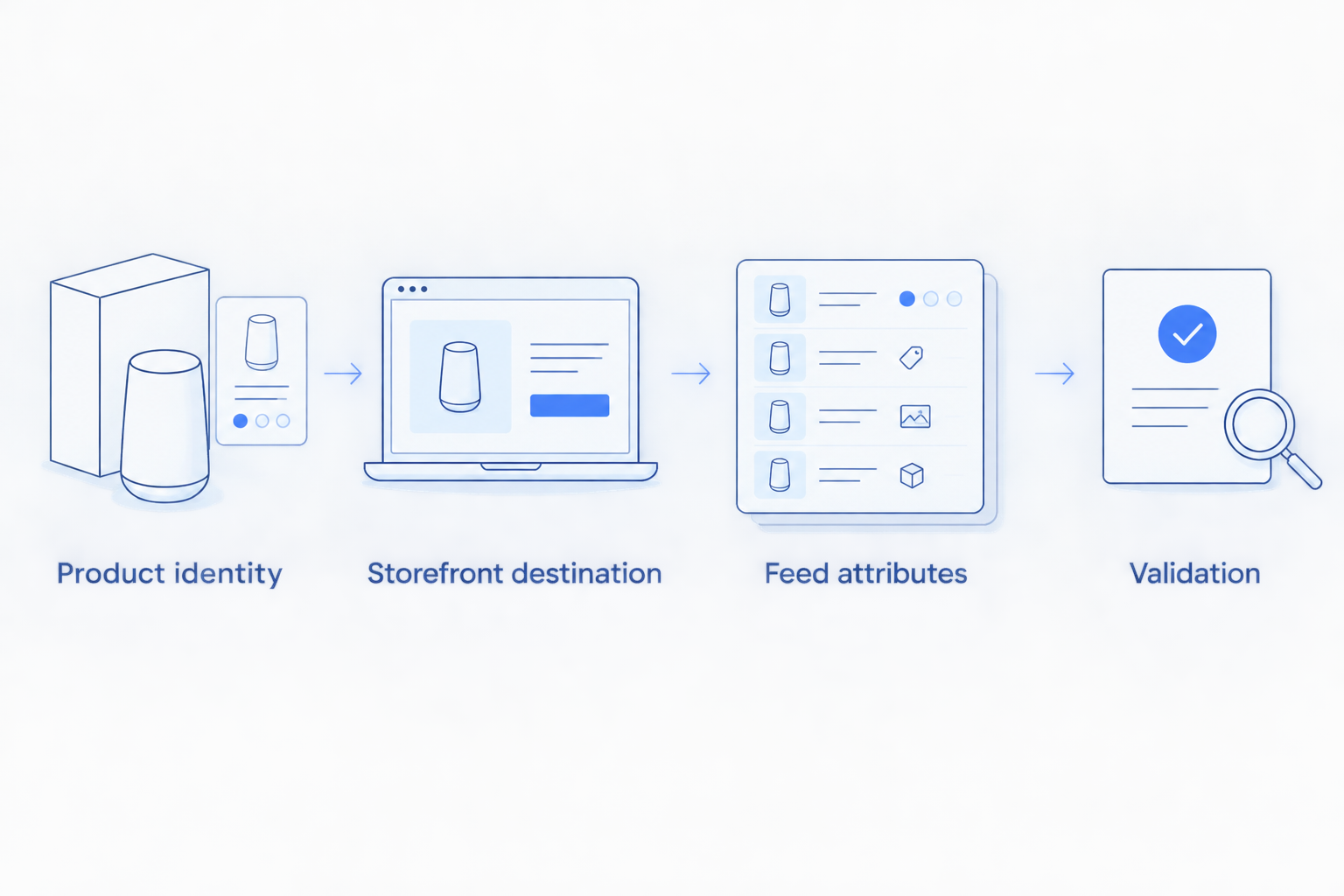
A good 2026 mapping file distinguishes Product identity, Storefront destination, Feed attributes, and Validation. Keep those responsibilities separate so a changed Amazon title cannot silently overwrite a storefront destination.
Feed attributes and content rules
- Create the required fields. Build a supported product-data file with Google's exact attribute names. Core fields include
id,title,description,link, andimage_link; requirements also depend on the product and destination. - Write channel-appropriate titles. Retain the brand, product type, and distinguishing variant details. Remove Amazon-specific language and unsupported promotional claims. Google's title limit is 150 characters, not a target you must fill.
- Clean descriptions. Describe the actual product rather than copying storefront navigation, shipping claims, or review snippets. The description attribute supports 5,000 characters; prioritize useful product facts over length.
- Preserve genuine identifiers. Populate
brand,gtin, andmpnas applicable. An ASIN is not a replacement for a GTIN. Useidentifier_existsaccording to the product's actual identifier status, not as a shortcut around missing information. - Map variants and operational fields. Use
item_group_idfor genuine variant groups and submit applicable distinguishing attributes. Sourcepriceandavailabilityfrom the system controlling your storefront, not from a stale Amazon export. - Validate image ownership and accessibility. Use assets you have permission to publish. Populate
image_linkwith a publicly accessible image that represents the submitted product and meets Google's image requirements.
Expected result: Your file contains accurate product facts, storefront destinations, and channel-appropriate fields without treating Amazon-specific identifiers as universal identifiers.
For the 2026 build, document which system owns each field. Catalog content can originate in a product-information system while storefront offer fields come from commerce operations. A feed becomes unreliable when both systems overwrite the same attribute without a defined priority.
Merchant Center source configuration
- Complete the website setup. In Merchant Center, verify and claim your selling website using an available verification method. Complete the business and shipping configuration required for the target market.
- Open the source settings. Find Data sources in Merchant Center settings. Create a product source using the supported file method presented in your account; interface wording varies with account setup.
- Set the source scope. Choose the intended country and language settings. Keep these aligned with the landing pages, checkout experience, and submitted product content.
- Provide the file location. For scheduled retrieval, supply the file's accessible location and configure the retrieval schedule. If authentication is required, use the supported credentials rather than an expiring browser-session link.
- Process and inspect the result. Review imported products and product issues after processing. Compare a sample against the original file and the actual storefront pages before treating the source as ready.
Expected result: Merchant Center retrieves the intended file, recognizes its attributes, and reports product-level outcomes that your team can investigate.
Do not interpret successful retrieval as approval. A file can parse correctly while individual products fail policy or landing-page checks. In 2026, your release gate should remain product eligibility, not merely a successful upload message.
Release controls and scheduled updates
- Add a publication gate. Publish only rows with complete identity mapping, valid destinations, and required attributes. Log rejected rows separately with actionable reasons.
- Set update ownership. Name the person or system responsible for file generation, retrieval failures, product issues, and storefront changes. An unattended schedule is not an owned workflow.
- Preserve the last valid output. Validate a newly generated file before replacing the published file. Alert the owner when generation fails instead of silently publishing a truncated export.
- Connect advertising after validation. Link the appropriate Google Ads account when you are ready to advertise. Confirm product eligibility and campaign targeting before activating spend.
Expected result: Catalog changes reach Merchant Center through a repeatable process, with failures visible before they become advertising problems.
Use product imagery as another release check. Deciding how many product photos you need is separate from choosing the feed's primary image: a detailed gallery does not excuse a primary image that misrepresents the submitted variant.
Keep the original owned image files available rather than relying on copied marketplace image locations. Review the primary image and the storefront gallery together so customers see the same product across the ad and destination.
Update the feed whenever catalog data changes
A scheduled full-file refresh is not the only honest variant. With Merchant API, you can build an event-driven workflow that updates affected products when your authoritative catalog or commerce system changes.
- Capture the product-change event from the system that owns the changed field.
- Resolve the same stable product identifier used in the existing feed.
- Transform only approved source fields into the required product-data structure.
- Submit the update and record the response.
- Reconcile submitted products against the source catalog to catch missed events and deliberate removals.
Expected result: Individual product changes update the existing records instead of creating duplicate offers.
Use event-driven updates for operational speed; retain reconciliation for completeness. A successful event handler cannot repair an event it never received.
For your 2026 architecture, avoid having a full-file source and an API integration compete over the same products without a documented ownership model. Define which source controls each record before expanding the integration.
Troubleshooting
Products point to Amazon instead of your storefront
Fix: Correct link in the transformation layer and regenerate the affected rows. Do not attempt to solve a destination-ownership problem by changing only the feed title or merchant name.
Check the final destination after redirects. A storefront-looking URL that forwards shoppers elsewhere still needs review against Google's destination requirements.
Merchant Center rejects product identifiers
Fix: Compare the submitted identifier with the manufacturer's actual identifier for that exact product and variant. Remove accidental whitespace and spreadsheet formatting errors without altering the identifier itself.
Do not put an ASIN into gtin. Do not mark an identifier as nonexistent merely because your export omitted it.
Variants appear as duplicates or unrelated products
Fix: Give every purchasable variation its own stable id, then apply a consistent item_group_id to genuine variants. Check that each landing page selects the submitted variant.
Group products by real variation relationships, not by shared advertising themes. Distinct products do not become variants because you sell them together in a campaign.
The source succeeds but products remain ineligible
Fix: Read the product-level issue, correct the underlying data or website problem, and follow the available review process when required. Re-uploading an unchanged file does not resolve a policy issue.
Keep technical ingestion checks separate from policy review. The team responsible for feed formatting is not always the team responsible for correcting website content.
Updates stop reaching Merchant Center
Fix: Check file access, authentication, generation logs, and the most recent retrieval or API response. Confirm that the source system actually produced a changed record before investigating downstream processing.
Compare the source record, published payload, and Merchant Center record in that order. This isolates whether the failure occurred during extraction, transformation, submission, or processing.
Customize your workflow
Expand coverage only after you can trace a product from its source record to its submitted payload and storefront destination. Add markets separately, with localized content and the operational settings each market requires.
If your storefront and Amazon catalog share inventory operations, define that relationship before adding more automation. The Shopify-to-Amazon inventory sync workflow addresses the adjacent synchronization problem; a Shopping feed does not itself synchronize inventory between sales channels.
Keep commercial ownership as clear as technical ownership. Atlisco's Amazon growth partnerships address the Amazon side of performance management. Assign Google feed maintenance, website corrections, and Google Ads execution explicitly when coordinating that work across teams.
FAQ
Can I send my Amazon catalog directly to Google Shopping?
You can reuse authorized Amazon catalog data, but an ordinary Merchant Center setup needs eligible product destinations on your own verified storefront. Uploading Amazon detail-page URLs is not a substitute for website ownership and eligibility.
Can I run this workflow if I only sell on Amazon?
Not as the own-storefront workflow described here. Establish an eligible selling website before building a feed intended for your own Merchant Center account.
Is an ASIN the same as a GTIN for Google Shopping?
No. An ASIN is Amazon's catalog identifier, while a GTIN is a standardized trade-item identifier. Submit the genuine GTIN when applicable rather than substituting the ASIN.
Is a scheduled file better than Merchant API?
A scheduled file is better for teams prioritizing inspectable exports and simpler operations. Merchant API fits teams that need programmatic updates and can maintain authentication, error handling, and reconciliation.
Can I reuse my Amazon listing photos in the feed?
You can reuse images you have the right to publish if they meet Google's requirements and accurately represent the submitted product. Use accessible image locations and verify that each image matches the relevant variant.
Does Merchant Center approval automatically launch Shopping ads?
No. Product eligibility and advertising activation are separate steps. Configure the appropriate Google Ads connection and campaign settings before expecting paid delivery.
Does Atlisco provide an Amazon-to-Google feed connector?
Atlisco's stated services are Amazon PPC management, listing SEO, and full-service growth partnerships. Those services do not establish a prebuilt Google Shopping connector; define feed implementation and maintenance responsibilities explicitly.
One last thing
A clean feed can still send shoppers to the wrong variant. Before release, follow a submitted product's destination and complete the variant-selection path yourself. That check catches a mismatch that a well-formatted spreadsheet alone cannot reveal.