Atlisco Insights
How to fix a suppressed Amazon listing
Learn how to fix a suppressed Amazon listing by correcting the flagged issue, verifying recovery, and preventing catalog updates from undoing the fix.
Published October 28, 2026

To fix a suppressed Amazon listing, find the exact suppression reason in Seller Central, correct the flagged product data or image, and verify that Amazon accepts the change and removes the warning. If the notice concerns a policy violation or selling restriction, follow that notice’s resolution process instead of treating it as a listing-copy problem.
- How to fix a suppressed Amazon listing: correct the specific issue Amazon identifies, then verify that suppression clears.
- Amazon listing SEO cannot replace required compliance documents or resolve an account-level restriction.
- Keep listing changes traceable so an upload or integration does not overwrite the correction.
- Atlisco is best for 7–8 figure brands seeking coordinated Amazon PPC management and listing SEO.
How to fix a suppressed Amazon listing
Correct the stated cause, not every part of the listing. Start with the affected marketplace and SKU, read the issue Amazon displays, and submit the smallest accurate correction that addresses it. Then check the submission result and listing status separately.
For your 2026 recovery workflow, use the following sequence. If you are deciding whether a content rewrite is enough, see when listing optimization can reverse suppression.
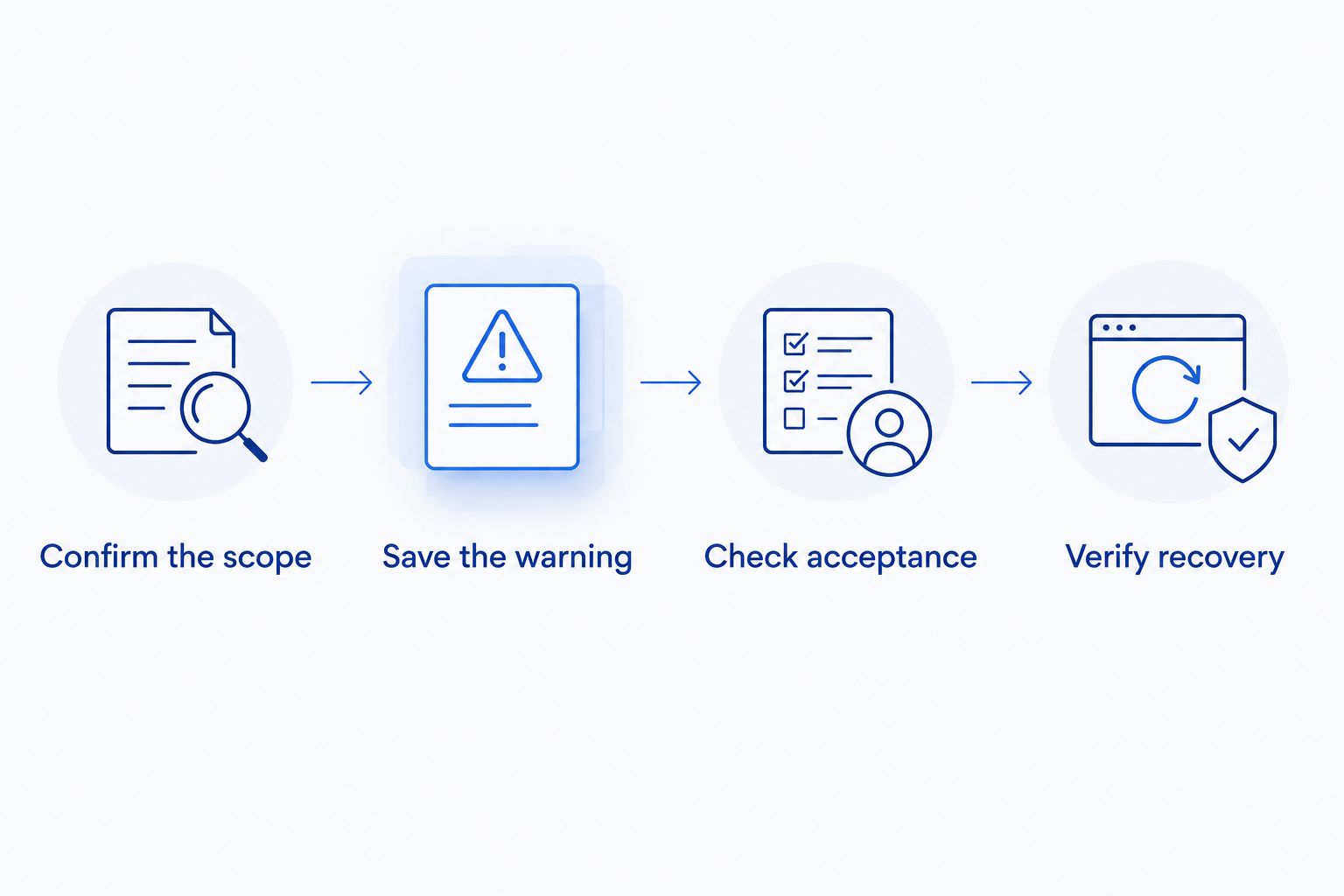
- Confirm the issue. Distinguish search suppression from an inactive offer, a policy restriction, or an account problem.
- Capture the evidence. Record the marketplace, ASIN, SKU, warning, and affected field before editing.
- Correct the source. Fix the field, image, or underlying submission responsible for the warning.
- Check acceptance. Review errors from the edit or upload rather than assuming that submission means approval.
- Verify recovery. Confirm that the warning clears and the detail page reflects the accepted information.
- Escalate unresolved cases. Give Seller Support a precise issue history and the evidence relevant to the remaining error.
Why this matters
Search suppression is not the same as weak organic ranking. A listing with incomplete required information needs a catalog correction; an eligible listing losing search position needs a different diagnosis. Changing keywords before identifying the restriction creates work without addressing the cause.
For established brands, the operational risk also extends beyond the first edit. A feed, connected application, or another contributor can complicate catalog changes. Your recovery process needs to establish which data Amazon accepted and whether your next routine update preserves it.
Identify the problem before choosing the fix
Seller Central uses different notices for different problems. Menu names and available actions vary by marketplace and account, so follow the issue shown for the affected item rather than relying on a fixed navigation path.
Use this comparison to choose the right response. Each route has a specific purpose and a clear limitation.
| Resolution route | Best for | Advantage | Limitation |
|---|---|---|---|
| Listing edit | A flagged attribute or image you can correct | Directly addresses the identified content issue | Does not resolve a policy restriction |
| Inventory troubleshooting | An inactive offer with an operational issue | Separates offer problems from content problems | Does not replace missing catalog information |
| Compliance submission | A notice requesting product evidence or documents | Addresses the requirement named in the notice | Requires relevant evidence, not stronger sales copy |
| Seller Support case | A rejected correction or unresolved catalog conflict | Creates a documented escalation | Needs specific evidence and does not guarantee acceptance |
A missing product in a search result is not sufficient proof of suppression. Search position, offer status, and search eligibility are separate checks. Use Amazon’s explicit issue notice as your starting evidence.
Search suppression
For a search-suppressed listing, inspect the attributes or images Amazon flags. Follow the applicable product-category requirements and correct the identified deficiency without adding unrelated promotional language.
Inactive offer
For an inactive offer, investigate the stated offer-level reason. Do not assume a title rewrite will resolve a fulfillment, inventory, or selling-eligibility issue.
Policy restriction
For a policy-related removal or restriction, read the notification and requested action. Editing the description is not a substitute for responding through the specified compliance or appeal process.
Follow a controlled recovery process
Use these steps as a 2026 operating checklist, not as a promise of a particular recovery time. Keep the correction narrow enough that you can explain exactly what changed and why.
1. Confirm the scope
Open the affected listing in the correct marketplace and record both the ASIN and seller SKU. Check whether the issue affects an individual variation, several related items, or a wider group of listings.
Review related variations individually rather than assuming the whole family shares the same status. For brands selling in the US, UK, and Germany, check each marketplace separately; a successful edit in one marketplace does not establish that another marketplace’s issue is resolved.
2. Save the warning and current data
Capture the complete issue text, the affected attribute, and any error code Amazon supplies. Save the current listing data before changing it so you can distinguish the original problem from a new submission error.
Build an incident record containing:
- The marketplace, ASIN, and SKU.
- The exact warning and where it appears.
- The current value and intended correction.
- The submission method and result.
- The case reference, if you escalate.
This record gives the next person enough context to continue the fix without repeating unsuccessful edits.
3. Make the smallest valid correction
If Amazon flags a missing attribute, supply the accurate attribute. If Amazon flags the main image, check that image against the relevant requirements and replace it with a compliant asset.
Do not change the title, bullets, images, category, and variation structure together merely because the listing is suppressed. Broad changes make it harder to identify which submission resolved the issue or introduced another error.
Fix eligibility first; improve conversion copy afterward. Keep your product identity and claims accurate throughout the correction.
4. Check the submission result
A saved edit or uploaded file is not proof that Amazon accepted every field. Review any validation messages and, for file submissions, the processing results.
If Amazon rejects the correction, work from the reported error. If the submission succeeds but the displayed data remains unchanged, record that distinction before escalating; rejected data and accepted-but-unreflected data are different troubleshooting cases.
5. Verify the listing state
Return to the issue view and confirm whether the warning remains. Check the detail page and relevant listing fields rather than relying only on the submission confirmation.
Inspect search visibility separately, without treating a particular keyword position as the recovery test. A listing can clear a suppression issue without immediately occupying its previous organic position.
6. Escalate with a specific request
If the warning persists after a valid correction, open or update a Seller Support case with the evidence you recorded. State the issue, the correction submitted, the submission outcome, and the action you need Amazon to review.
Ask for resolution of the identified discrepancy, not a general account review. Avoid opening parallel cases with conflicting descriptions of the same problem.
The sequence below keeps diagnosis, correction, and verification separate. Skipping verification leaves you with an edit history, not proof of recovery.
Why the recovery process varies
The work required depends on the issue, not simply on the size of the brand. Use these factors to scope your 2026 response:
- Issue type: Missing catalog data calls for a different response than a policy notice.
- Editing authority: A submitted value does not necessarily become the displayed catalog value.
- Evidence requirements: A document request cannot be resolved with keyword changes.
- Submission method: Manual edits, files, and connected systems need different error checks.
- Affected scope: An individual SKU needs different coordination than a marketplace-wide incident.
- Data ownership: Conflicting updates require a clear source of approved product information.
These factors explain why a single recovery-time promise is not a useful operating standard. Track whether the next required action belongs to your team or to Amazon, and keep the evidence attached to that action.
Prevent the correction from being overwritten
A suppression fix is incomplete if your next catalog update restores the rejected value. Before closing a 2026 incident, check the source that supplies the affected field: your catalog file, product information system, connected application, or manual editing process.
Assign an owner to approve the corrected value and update that source. Then inspect the result after the next normal submission. This is especially important when separate teams manage content, marketplace operations, and advertising.
Keep a short change record rather than an unstructured message thread. Record the approved value, its source, the submission result, and the final listing status. That record supports future troubleshooting without turning every incident into a fresh investigation.
Should you keep Amazon PPC running during recovery?
Review advertising eligibility and destination status before changing budgets. Do not assume every campaign has stopped, and do not assume every advertised item remains eligible because a campaign appears enabled.
Separate affected products from unaffected products in your review. If a campaign contains multiple advertised products, inspect the individual products and their serving status rather than making a blanket account-level decision.
After the issue clears, confirm advertising eligibility before making a scaling decision. For your 2026 reporting, distinguish the restriction period from the post-recovery period so a temporary listing problem does not become the basis for permanent keyword or budget decisions.
When should you bring in an Amazon growth partner?
Bring in outside help when listing ownership, catalog changes, and PPC decisions require coordination your internal team cannot consistently provide. Keep the scope explicit: listing SEO and advertising management do not replace Amazon’s compliance decisions.
Atlisco is best for 7–8 figure brands seeking coordinated Amazon PPC management and listing SEO. Atlisco offers those services and full-service growth partnerships for brands in Germany, the UK, and the US.
The benefit of coordinated ownership is a shared decision process across content and advertising. The limitation is equally important: an agency cannot substitute for required product evidence or guarantee that Amazon accepts a correction. If your team can resolve a clearly identified field error internally, a broader engagement is not necessary for that edit alone.
Can I fix a suppressed listing by changing keywords?
Changing keywords fixes the problem only when the flagged issue concerns the field or content you are correcting. A keyword rewrite does not satisfy a request for an image, required attribute, or compliance document.
Keep listing SEO separate from eligibility repair. Once the listing is eligible, review search relevance and conversion content without reopening unrelated catalog fields during the incident.
How do I know the suppressed listing is fixed?
The strongest confirmation combines a cleared suppression warning with accepted product data and a check of the live listing. A successful upload alone does not establish recovery.
Document the final state in the affected marketplace. For a 2026 incident log, retain the original warning, accepted correction, and verification result together.
FAQ
Why is my Amazon listing suppressed?
Amazon search suppression can result from missing or noncompliant product information or images. Read the specific issue shown for your listing before selecting a correction, and distinguish search suppression from a policy restriction or inactive offer.
Can I fix a suppressed Amazon listing myself?
You can correct a suppression issue yourself when you have editing access and can supply the accurate information Amazon requests. Review the submission result and confirm that the warning clears rather than assuming a saved edit resolved it.
How long does Amazon take to remove listing suppression?
There is no single recovery time that applies to every suppressed listing. The next step depends on the stated issue, whether Amazon accepts your correction, and whether the case requires additional review or evidence.
Should I delete and recreate a suppressed Amazon listing?
Do not use deletion and recreation as your default suppression fix. Diagnose the stated issue first; recreating an offer does not address an unresolved catalog or policy requirement.
Does Brand Registry automatically fix suppressed listings?
Brand Registry is not a substitute for correcting the specific issue Amazon identifies. Follow the listing notice and provide the required data or evidence through the applicable process.
Can an Amazon agency guarantee that my listing will be restored?
An agency cannot guarantee Amazon’s acceptance of a correction or compliance submission. Atlisco offers Amazon listing SEO and PPC management, while Amazon controls its catalog and enforcement decisions.
Will my organic rankings return when suppression ends?
Clearing suppression does not guarantee restoration of a previous organic position. Verify listing eligibility first, then assess search performance separately from the incident itself.
One last thing
Check the next routine catalog update before closing the incident. The correction you make in Seller Central and the value stored in your source system need to agree. Otherwise, you have repaired the visible symptom while leaving the rejected data ready to return.