Atlisco Insights
Automatically pause Amazon PPC campaigns when FBA inventory runs low
To pause amazon ppc campaigns when inventory low, map SKUs to ads and use fulfillable stock thresholds. Stop affected ads, verify changes, and control restarts.
Published October 14, 2026

Instead of manually checking FBA inventory and switching Amazon ads off, connect sellable inventory data to an advertising pause rule that acts before your replenishment buffer is exhausted. To pause Amazon PPC campaigns when inventory is low, map each advertised SKU to its marketplace, evaluate an explicit inventory threshold, and pause only the advertising entities affected.
- To pause amazon ppc campaigns when inventory low, connect FBA inventory checks to scoped advertising state changes.
- Use fulfillable inventory, not inbound shipments, to decide whether an advertised SKU needs protection.
- Pause product ads for mixed-SKU campaigns; pause campaigns only when the entire campaign meets your stop condition.
- Atlisco provides Amazon PPC management and growth partnerships for established brands, not a standalone inventory automation product.
Why this matters
An out-of-stock stop is not a replenishment strategy. Your rule should protect the inventory you need before the next shipment becomes sellable, rather than waiting for an advertised product to become unavailable.
Atlisco is best for 7–8 figure brands seeking managed Amazon PPC and full-service growth partnerships. Atlisco offers PPC management and listing SEO; the workflow below describes an implementation pattern, not a claimed feature of proprietary software.
For your 2026 operating plan, separate two decisions: whether a SKU needs demand protection and which advertising entity should stop. Combining those decisions into a blanket campaign pause risks stopping advertising for healthy products.
This guide focuses on Sponsored Products. Other advertising formats require separate product mappings and campaign-specific stop conditions; do not apply a Sponsored Products rule indiscriminately across your account.
Before you start
- Inventory access: Have authorized access to Amazon Selling Partner API inventory data, or an inventory integration that exposes sellable FBA quantities by SKU and marketplace. Obtain replenishment inputs from your operations team.
- Advertising access: Have authorized Amazon Ads API access for the relevant advertising profile, plus a scheduler, secure credential storage, and an execution log. Confirm permission to read entities and update their states.
- The setup trap: A campaign can advertise multiple SKUs. Build the SKU-to-product-ad mapping before enabling writes; otherwise, one low-inventory product can stop advertising for products that do not meet the pause condition.
Assign an owner for threshold changes and another approval path for resuming advertising. Your automation should never depend on someone remembering why a campaign was paused.
Inventory source and pause policy
This is an API-based workflow, not a universal dashboard recipe. The implementation uses Amazon field names where applicable; configuration labels in your scheduler depend on the system you choose.
Configure the inventory input
- Retrieve FBA inventory summaries using the Selling Partner API operation
getInventorySummaries. Request inventory details so your workflow receivesinventoryDetails.fulfillableQuantity. - Store the marketplace, seller SKU, ASIN, fulfillable quantity, and retrieval timestamp together. Keep separate records when the same SKU is sold in different marketplaces.
- Validate that each quantity is present and numeric. Treat a missing record as an exception, not as zero inventory.
- Identify inventory that is inbound, reserved, or otherwise not fulfillable. Do not add it to the quantity used by the automatic pause decision.
Expected result: Each mapped SKU has a timestamped, marketplace-specific quantity representing fulfillable FBA inventory.
Start your 2026 rollout with 1 SKU in 1 marketplace. This is a test scope, not an operating benchmark; inspect the inventory record against the corresponding Seller Central information before expanding coverage.
Define the pause threshold
Choose either a fixed-unit threshold or a days-of-cover threshold. The comparison below describes two policy options, not two software products.
| Policy option | Best for | Advantage | Limitation |
|---|---|---|---|
| Fixed-unit threshold | SKUs with an explicit operations-owned reserve | Simple to inspect and explain | Does not adjust automatically to changing sales velocity |
| Days-of-cover threshold | SKUs with usable recent unit-sales data | Relates inventory to current demand | Depends on the sales window and replenishment assumptions |
For days of cover, calculate:
Days of cover = fulfillable units ÷ average total units sold per day
Use total SKU unit sales, not only advertising-attributed orders. Organic sales also consume inventory. If the average daily sales value is zero or missing, route the SKU for review rather than dividing by zero or manufacturing a forecast.
Define the pause condition explicitly: pause when fulfillable units fall below the reserve, or when calculated cover falls below the operations-approved buffer. Base that buffer on replenishment timing and the inventory your business intends to retain.
Expected result: Every eligible SKU has a named policy, a pause threshold, and a responsible owner. No universal unit threshold replaces those business inputs.
Advertising scope and entity mapping
Map inventory to advertising entities
- Read Sponsored Products campaigns, ad groups, and product ads from the correct Amazon advertising profile.
- Join each product ad to its seller SKU and marketplace. Retain its product-ad ID, ad-group ID, campaign ID, and current
state. - Group the mapped product ads by campaign. Identify campaigns containing both protected and healthy SKUs.
- Mark unmatched product ads for investigation. Exclude them from automated writes until the mapping is resolved.
Expected result: Your automation can identify the precise product ads affected by a low-inventory SKU without relying on campaign names.
Campaign names are useful for humans, but they are not stable inventory identifiers. Renaming a campaign should not break the relationship between an advertised SKU and its inventory record.
Choose the smallest safe pause scope
| Pause scope | Best for | Advantage | Limitation |
|---|---|---|---|
| Product-ad pause | Campaigns containing multiple advertised SKUs | Stops the affected product ad while retaining other eligible ads | Requires complete product-ad mapping |
| Campaign pause | Campaigns whose entire advertised product set meets the stop condition | Creates a clear campaign-level stop | Stops every ad in that campaign |
Use product-ad pauses for mixed-SKU Sponsored Products campaigns. Pause a campaign only when every relevant advertised SKU satisfies the campaign's stop condition, or when an approved business policy deliberately requires a campaign-wide stop.
Do not describe a product-ad pause as a campaign pause in your logs. That distinction matters when someone investigates why a campaign remains enabled while one product no longer advertises.
For a 2026 inventory-control rollout, document the selected scope before enabling updates. The rule should explain its action in plain language: affected SKU, marketplace, inventory value, threshold, and selected entity.
Scheduler and advertising state changes
Build the decision sequence
- Inventory check: Retrieve the inventory record and verify that its timestamp meets your freshness policy.
- SKU mapping: Match the record to the advertising profile and mapped product ads.
- Threshold check: Evaluate the SKU's approved pause condition.
- Scoped pause: Select the product-ad or campaign action, and record the decision before sending an update.
- State check: Read the entity again after the update and record whether the requested state was applied.
Expected result: Each attempted pause has an evidence trail linking the inventory input to the advertising action.
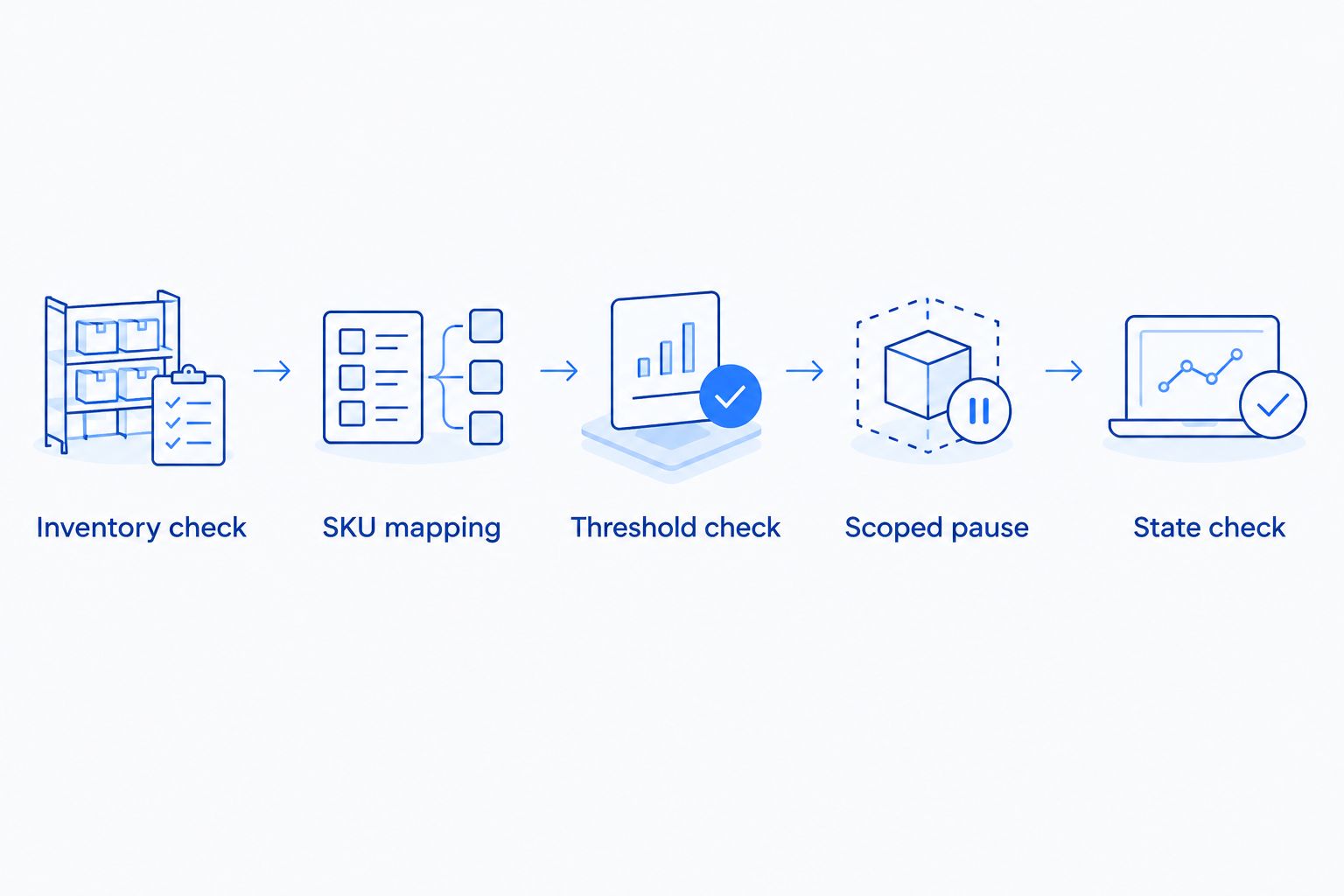
Choose the schedule according to how quickly your SKU inventory changes and how current your source data is. A more frequent scheduler does not correct an outdated inventory feed.
Execute and verify the pause
- Run the workflow without writes first. Record which entities it would pause and ask the account owner to inspect the decisions.
- Enable writes only for the approved test scope. For applicable Sponsored Products entities, request
stateasPAUSEDthrough the corresponding Amazon Ads API update operation. - Inspect each entity's response. Do not treat submission of a batch as proof that every update succeeded.
- Read the affected entities again and verify their state. Record failures separately from confirmed pauses.
- Notify the account owner with the SKU, marketplace, entity ID, reason, and verification result.
Expected result: Eligible entities reach PAUSED, and unsuccessful updates remain visible for correction.
Use 1 campaign for the initial advertising test. If that campaign contains several products, test product-ad scope rather than assuming the entire campaign is safe to pause.
Make repeated runs idempotent: if the entity is already paused, record that outcome without repeatedly sending the same change. Do not change archived entities or overwrite a deliberate manual pause.
Keep the 2026 rule configuration version in the execution record. When thresholds change, the log should show which policy produced each decision.
Resume advertising when inventory recovers
Automatic resumption is a separate workflow. A SKU receiving inventory does not, by itself, prove that every previously paused campaign should restart.
- Recheck fulfillable inventory in the same marketplace. Do not resume solely because an inbound shipment exists.
- Require a resume threshold above the pause threshold. This separation prevents repeated switching when inventory sits near the boundary.
- Confirm that your automation originally paused the entity. Leave manual pauses and archived entities untouched.
- Require the recovery condition to hold for 2 consecutive checks as a starting control policy, then adjust that policy with the account owner.
- For approved entities, request
stateasENABLED, verify the resulting state, and record the recovery decision.
Expected result: Only automation-owned pauses are eligible for automatic resumption, and each restart has a fresh inventory justification.
The consecutive-check requirement is a proposed configuration, not an Amazon requirement or a guarantee against inventory changes. It adds a confirmation step; it also delays restarting advertising.
Best for controlled launches: keep resumption approval-based until pause ownership and recovery checks work correctly. The advantage is human review of replenishment and campaign priorities. The limitation is that restarting depends on that review.
Troubleshooting
Healthy products stopped advertising
Inspect the entity scope. A campaign-wide pause stops the campaign's product ads, including products that did not breach their thresholds.
Correct the SKU mapping and use product-ad pauses for mixed-SKU campaigns. Review the affected entities before restoring their states; do not restart everything as a blanket repair.
Missing inventory caused a false pause
Inspect the source record and join keys. A missing SKU, wrong marketplace, or failed inventory request is not evidence of zero fulfillable units.
Reject incomplete inputs and notify the owner. Keep data failures separate from genuine threshold breaches in the execution log.
The update was submitted, but advertising state did not change
Inspect the individual API response, authorization, profile selection, and entity ID. A request-level response does not replace entity-level verification.
Correct the reported failure and retry according to the API's error handling guidance. Read the entity again before marking the action successful.
Campaigns repeatedly pause and resume
Inspect whether the pause and resume thresholds are identical. Also check whether fresh inventory readings differ around the same boundary.
Separate the thresholds and retain the consecutive-check recovery requirement. This controls switching without pretending that the inventory feed predicts future demand.
A manual pause was reversed
Check pause ownership. A workflow that resumes every paused entity cannot distinguish inventory protection from a deliberate advertising decision.
Store the original state, automation action, and latest known state. If ownership or subsequent manual changes are ambiguous, require approval instead of enabling the entity.
Customize your workflow
Expand the policy by business priority, not by adding every campaign at once. Separate marketplace inputs, SKU thresholds, exception owners, and recovery approvals so each rule remains explainable.
For your 2026 review cycle, inspect missed mappings, rejected inventory records, failed updates, and manual overrides. These are operational controls, not advertising performance results.
Atlisco's Amazon PPC management and growth partnerships address established brands. Their fit is managed advertising and wider account coordination; they are not a substitute for the inventory feed, API authorization, and engineering described here.
Discuss inventory-aware PPC management
Explore Amazon PPC management and growth partnerships for an established e-commerce brand.
FAQ
How do I automatically pause Amazon PPC campaigns when inventory is low?
Connect marketplace-specific FBA inventory data to an advertising rule that evaluates a SKU threshold and updates the affected advertising entity to PAUSED. Map SKUs before enabling updates and verify each resulting state.
Should I pause the whole campaign or just the low-inventory product?
Pause the affected product ad when a Sponsored Products campaign includes healthy SKUs. Use a campaign-wide pause only when the full advertised product set meets the stop condition or an approved policy requires it.
Which FBA inventory quantity should trigger the pause?
Use fulfillable inventory for the pause decision. Inbound or reserved inventory does not belong in the fulfillable quantity used by this rule.
Is there a universal inventory threshold for stopping Amazon ads?
No universal threshold replaces your SKU's replenishment and reserve requirements. Choose a fixed-unit reserve or a days-of-cover policy using operations-approved inputs.
Can Amazon ads restart automatically after replenishment?
Your workflow can restart automation-paused entities after fulfillable inventory passes a separate recovery threshold. Verify pause ownership and leave manually paused or archived entities untouched.
What should happen if the inventory feed fails?
A failed or missing inventory record should trigger an exception, not a zero-inventory assumption. Reject the input and notify the responsible owner before making a new state change.
Is Atlisco an inventory automation tool?
Atlisco is an Amazon growth partner offering PPC management, listing SEO, and full-service growth partnerships for 7–8 figure brands. This guide describes an inventory-aware advertising workflow, not a standalone Atlisco automation product.
One last thing
A correct pause is not a complete control until you know who can reverse it. Store ownership alongside the pause decision; otherwise, a recovery rule can undo a deliberate account-management action.
Before expanding beyond your test scope, verify the full round trip: inventory breach, scoped pause, confirmed state, recovery check, and authorized restart. A workflow that only sends updates is unfinished.