Atlisco Insights
How to connect Amazon Attribution to Google Analytics
Connect Amazon Attribution to Google Analytics through campaign reporting, not native sync. Track outbound clicks, map campaigns, and reconcile Amazon sales.
Published October 14, 2026

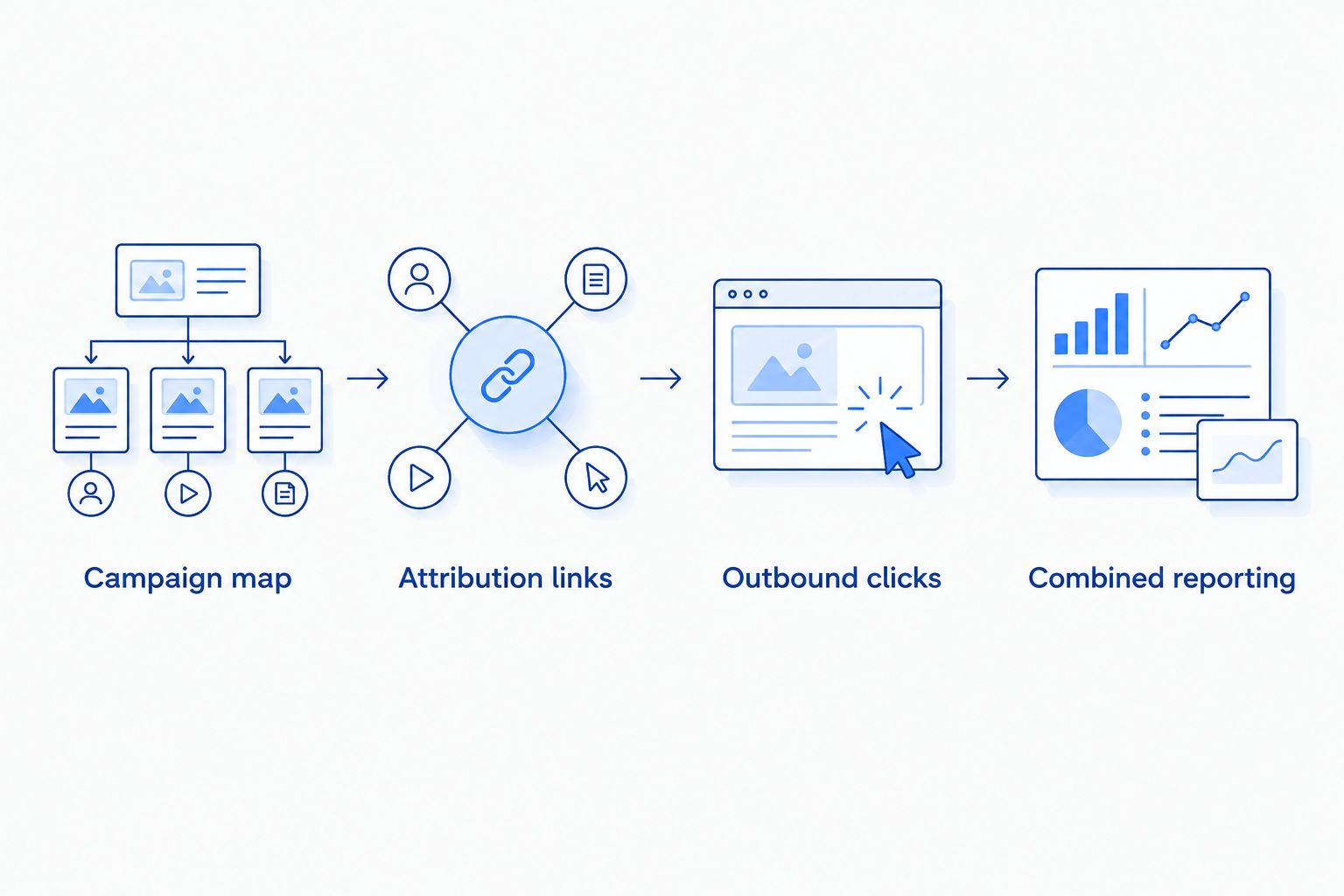
Instead of manually reconciling external traffic and Amazon sales, connect Amazon Attribution to Google Analytics through a shared campaign map and reporting workflow—not a native purchase-event sync. This guide covers the landing-page setup, tagged Amazon links, GA4 validation, and reporting controls relevant to Atlisco's Amazon growth partnerships.
- Connect Amazon Attribution to Google Analytics through campaign-level reporting, not a native purchase-event sync.
- GA4 measures your website visits and outbound clicks; Amazon Attribution measures eligible activity after tagged Amazon visits.
- Use matching campaign names and a mapping sheet to reconcile external traffic with attributed Amazon sales.
- Atlisco's Amazon growth partnerships serve 7–8 figure e-commerce brands; measurement should support profitability decisions.
Why this matters
Google Analytics cannot observe Amazon checkout through the GA4 tag installed on your website. Amazon Attribution fills a different measurement role: it reports eligible Amazon activity associated with tagged external traffic. Combining their reports connects campaign decisions, not individual customer journeys.
Your 2026 measurement plan needs that distinction. A website visit, an outbound Amazon click, and an attributed Amazon purchase are separate events with separate counting rules. Treating them as one funnel without checking those rules produces misleading conversion rates.
Atlisco is best for 7–8 figure e-commerce brands seeking Amazon PPC management, listing SEO, and full-service growth partnerships. For those brands, this workflow supports campaign-level decisions; it does not establish customer-level attribution or prove incremental sales.
Before you start
- Confirm access and eligibility. You need access to Amazon Attribution through your eligible Amazon advertising account, a GA4 property with a web data stream, and permission to edit your website's links and measurement settings.
- Prepare your destinations and campaign map. Identify the Amazon destination, external traffic source, landing page, and reporting owner. Keep a spreadsheet that maps website campaign names to Amazon Attribution campaigns and ad groups.
- Choose the traffic route first. GA4 requires a tagged website you control to measure the website portion of this workflow. Traffic sent straight to Amazon bypasses that website, and adding UTM parameters to an Amazon URL does not install your GA4 measurement there.
The setup below uses a landing page you control before the Amazon destination. It gives you website engagement and outbound-click data, but adds a step to the customer journey. Do not introduce that step solely to make a dashboard look complete.
Choose your measurement route
There are two practical routes. Choose based on what the customer needs before buying, not on which report contains more fields.
| Route | Best for | What you measure | Advantage | Limitation |
|---|---|---|---|---|
| Website landing page, then Amazon | Campaigns requiring education or product context | GA4 website activity plus Amazon Attribution results | Connects website engagement with campaign-level Amazon outcomes | Adds a website visit before Amazon; does not connect individual purchases to GA4 users |
| Direct Amazon link | Campaigns whose destination should be Amazon immediately | Amazon Attribution results and the traffic source's own reporting | Avoids an intermediate website visit | Your website's GA4 property does not measure that Amazon visit |
Use the website route only when the landing page earns its place. For a direct-to-Amazon campaign, use the second workflow later in this guide rather than forcing an unnecessary redirect.
Campaign map
- Define your reporting grain. Decide whether you will evaluate each channel, campaign, or creative. Use the same grain in the website campaign map and Amazon Attribution structure; a channel-wide tag cannot provide creative-level sales detail.
- Create the mapping sheet. Include marketplace, destination product or Store, website campaign name, traffic source, medium, Amazon Attribution campaign, ad group, and attribution URL. Add an owner responsible for maintaining each mapping.
- Set a naming convention. For a 2026 campaign, an illustrative website campaign value is
summer_launch_2026. Keep spelling, capitalization, and separators consistent across your campaign map and reporting exports. - Define what each metric means. Separate website sessions, outbound-click events, Amazon Attribution clicks, attributed purchases, and attributed sales. Do not rename all of them as conversions.
Expected result: every traffic source has an identifiable reporting row, and every Amazon attribution URL maps to the intended campaign. Someone unfamiliar with the setup should be able to trace a link back to its owner without guessing.
Avoid using one attribution URL across unrelated placements. That makes implementation simpler but removes the separation needed to decide which placement deserves continued investment.
Amazon Attribution links
- Open the Amazon Ads console and select Amazon Attribution. Confirm the account and marketplace before creating campaign links; reporting for the wrong marketplace will not answer the campaign's commercial question.
- Select Create campaign, then Create manually for the manual campaign workflow. Name the campaign using the convention recorded in your mapping sheet, and select the products relevant to the campaign.
- Configure the ad groups and their publisher, channel, and destination information. Separate placements that require separate decisions rather than combining them under one reporting label.
- Complete campaign creation and copy the generated attribution URLs. Store the full URLs in the mapping sheet, then replace the relevant Amazon buttons on your landing page with those exact links.
- Test each destination. Confirm that the link opens the intended Amazon product or Store in the intended marketplace, and that your website does not replace it with an untagged destination.
Expected result: each Amazon button uses the attribution URL assigned to its placement. The generated link—not a manually reconstructed Amazon URL—is the destination recorded in your campaign map.
Do not edit attribution parameters to make the URL shorter. If your website uses a redirect, check that the redirect preserves the generated destination. A button that reaches the right product can still lose its measurement parameters along the way.
GA4 outbound-click measurement
- In GA4, open Admin, then Data streams, and select the web stream used by your landing page. Confirm that the stream belongs to the property your reporting team actually uses.
- Open the settings for Enhanced measurement and enable Outbound clicks. GA4's enhanced measurement can collect outbound
clickevents when visitors follow links to another domain. - Send external traffic to your landing page using a consistent UTM convention. Use
utm_source,utm_medium, andutm_campaignto identify the incoming campaign; these parameters belong on the website destination for this workflow. - Open the landing page in a test session and follow its Amazon link. Use Realtime to check incoming activity and DebugView when your test device is configured for debug mode to inspect the outbound event and its parameters.
- Verify the destination using
link_urlorlink_domainin the event details. Check that the event identifies the Amazon destination, not an intermediate website action that never opens Amazon.
Expected result: GA4 records the landing-page visit and the outbound Amazon click. Amazon Attribution receives the tagged Amazon visit; it does not send the resulting purchase to your GA4 property through this setup.
For your 2026 launch checklist, perform at least 1 test click per placement before activating its traffic. This is a validation recommendation, not a claim about platform processing speed. Use the actual published page, because preview behavior alone does not validate the live link.
Combined reporting
- Build a GA4 exploration using Explore and Free form. Use campaign dimensions such as Session source / medium and Session campaign alongside metrics appropriate to your question, including Sessions and Event count.
- Keep outbound-click reporting separate from total event reporting. Filter the outbound analysis to the
clickevent and the Amazon destination; otherwise, the count can include unrelated website interactions. - Export Amazon Attribution reporting at the campaign or ad-group level supported by your mapping sheet. Retain the identifiers needed to distinguish placements, products, and marketplaces.
- Join the reports using your campaign map. Align the reporting period and document time-zone differences rather than assuming matching date labels guarantee matching time boundaries.
- Keep source metrics in separate columns. Compare website engagement with attributed Amazon outcomes without presenting the joined table as a user-level purchase funnel.
Expected result: you can review website sessions, Amazon-bound clicks, and attributed Amazon results for the same mapped campaign. You cannot identify which GA4 visitor completed an Amazon order from this aggregate join.
Amazon Ads' Amazon Attribution measurement documentation describes a 14-day attribution window. In your 2026 reporting notes, distinguish that attribution window from the calendar dates selected in an export. A campaign report viewed immediately after traffic runs is not equivalent to a report viewed after its attribution window has elapsed.
Direct-to-Amazon campaign reporting
Use this variant when your external campaign should send people directly to Amazon. It removes the website step, so it also removes your website's GA4 measurement from that journey.
- Create the Amazon Attribution campaign and placement-specific links using the same campaign-map process.
- Use the generated attribution URL as the external campaign's destination, subject to that channel's destination requirements.
- Record the external platform's campaign identifier beside the Amazon Attribution campaign and ad group.
- Combine the external platform's campaign reporting with Amazon Attribution results. Do not expect those visits to appear as sessions in your website's GA4 property.
Expected result: the external campaign and Amazon outcomes share a reporting map without an intermediate landing page. The trade-off is explicit: you retain Amazon attribution reporting but lose website engagement data for that route.
For ongoing reporting in 2026, automate exports only after the manual join works. An API or reporting connector moves data; it does not resolve inconsistent campaign names, mismatched reporting periods, or missing placement mappings.
Troubleshooting
GA4 records visits but no Amazon clicks
Check Outbound clicks under Enhanced measurement, then test a standard link to the Amazon destination. Script-driven buttons and internal redirect paths need validation because their behavior can differ from a direct external link.
Also inspect cross-domain measurement. GA4 does not treat links to domains configured for cross-domain measurement as normal outbound clicks; adding Amazon there does not give you access to Amazon checkout measurement.
Amazon Attribution shows no expected activity
Compare the published button destination with the generated attribution URL. Check redirects, link replacements, and marketplace selection before changing reporting settings.
An ordinary Amazon product URL can reach the correct page without carrying the attribution information your campaign requires. Validate the actual destination, not just its visible button label.
Campaign names do not match
Fix the mapping sheet before rebuilding reports. Capitalization, renamed campaigns, and shared tags can split or combine rows incorrectly.
Keep historical names associated with their original links. Renaming a spreadsheet row does not rewrite measurement already collected under another campaign structure.
GA4 clicks differ from Amazon Attribution clicks
Do not force the counts to match. The platforms measure activity at different points, and consent settings, browser restrictions, repeat clicks, and navigation behavior affect what each records.
Compare equivalent periods and placements first. Then investigate the measurement difference rather than labelling it a sales loss.
Amazon purchases are absent from GA4
That is the expected result of this workflow, not a broken connection. An outbound Amazon click is not an Amazon purchase.
Keep purchases in the Amazon Attribution report. Do not create a GA4 purchase event merely because someone clicked the Amazon button; that would misstate revenue performance.
Customize your workflow
Expand measurement by marketplace, product group, or placement when those distinctions change a budget decision. Keep each expansion tied to a maintained campaign map; more rows without ownership create reporting noise.
Use campaign-level attributed sales alongside your actual margin inputs and external media spend. Attributed revenue alone does not establish profitability, and attributed purchases do not establish incremental demand.
Atlisco's Amazon growth partnerships combine PPC management, listing SEO, and broader growth support. This measurement workflow supplies context for those decisions; it does not replace Amazon campaign analysis or listing work.
Discuss your Amazon growth plan
Connect measurement decisions with Amazon PPC management, listing SEO, and growth partnerships.
FAQ
Can I connect Amazon Attribution to Google Analytics directly?
There is no native purchase-event sync in the workflow described here. Connect the reporting through consistent campaign mapping, GA4 website measurement, and Amazon Attribution exports.
Can Google Analytics track purchases on Amazon?
Your website's GA4 tag cannot track checkout on Amazon. Use Amazon Attribution for eligible attributed Amazon purchases and keep those results separate from GA4 website events.
Do I need a website landing page for Amazon Attribution?
No, Amazon Attribution links can send external traffic directly to Amazon. You need a tagged website landing page only if you want your GA4 property to measure website engagement before the Amazon visit.
Should I add UTM parameters to my Amazon link?
UTM parameters on an Amazon link do not make that visit measurable by your website's GA4 property. Use UTMs on the landing-page URL and the generated Amazon Attribution URL on the outbound Amazon button.
Why are GA4 outbound clicks different from Amazon Attribution clicks?
GA4 and Amazon Attribution measure activity at different points under different collection rules. Align placements, reporting dates, and time zones before investigating consent, browser behavior, redirects, or repeated clicks.
Can I automate the combined reporting?
Yes, reporting exports or an appropriate API-based workflow can support automation. Validate the manual campaign join first; automation cannot repair an incorrect mapping or turn aggregate reports into customer-level attribution.
Who is Atlisco's Amazon growth service designed for?
Atlisco serves 7–8 figure e-commerce brands in Germany, the UK, and the US. Its stated services include Amazon PPC management, listing SEO, and full-service growth partnerships.
One last thing
Name the Amazon outbound event as a click, not a purchase. Even if you designate it as a GA4 key event, that designation changes its reporting importance—not what happened.
Before using the combined report for a 2026 budget decision, ask someone outside the implementation team to trace one campaign from its external destination through its Amazon tag to its reporting row. If the connection requires an explanation from memory, improve the mapping before expanding the workflow.