Atlisco Insights
Seller Central to Vendor Central: complete 2026 workflow
Plan your seller central to vendor central transition before switching. Check supplier terms, preserve ASINs, test shipments, and separate advertising reports.
Published October 14, 2026

Instead of manually reconciling seller inventory, vendor purchase orders, and advertising every day, organize your seller central to vendor central transition around approved products, purchasing terms, shipment checks, and separate reporting. Vendor Central is invitation-only: this is a change from selling to shoppers to supplying Amazon, not an account-conversion setting.
- A seller central to vendor central transition requires Amazon’s invitation, commercial approval, and a separate operating workflow.
- Keep Seller Central active until vendor purchase orders, shipments, receipts, and financial reconciliation pass your acceptance checks.
- Atlisco’s Amazon growth services fit established brands seeking PPC management, listing SEO, and full-service growth partnerships.
- Preserve ASIN identity, verify advertising access, and separate seller revenue from vendor invoices.
Why this matters
Seller Central supports the third-party seller model: you sell to customers through Amazon. Vendor Central supports the first-party supplier model: Amazon purchases your products and resells them. Moving to Vendor Central changes the commercial relationship, not just the dashboard.
For your 2026 transition, judge the decision on contribution after operating expenses, deductions, fulfillment obligations, and advertising. A larger Amazon purchasing commitment does not establish better profitability by itself.
Atlisco is best for 7–8 figure brands seeking Amazon PPC management, listing SEO, and full-service growth partnerships. That support addresses growth execution; your finance and operations teams must still own purchasing terms, shipment compliance, and reconciliation.
Choose the operating model before changing accounts
These are business models, not interchangeable account settings. Choose based on the commercial agreement and the responsibilities your team can support.
| Model | Best for | Main advantage | Main limitation |
|---|---|---|---|
| Seller Central | Brands prioritizing direct control of their seller offer | Direct management of seller inventory, offers, and customer sales reporting | The brand retains seller-account and fulfillment responsibilities |
| Vendor Central | Brands with an Amazon invitation and approved supplier economics | A wholesale purchasing relationship with Amazon | Amazon controls its retail offer; purchase orders and supplier compliance require separate operations |
| Hybrid model | Brands maintaining approved seller and vendor operations | Products can follow different operating models | Inventory, catalog contributions, advertising, and reporting need explicit ownership |
Do not treat Vendor Central as an automatic upgrade. Accept the supplier model only when the agreed economics and operational requirements fit your business.
Before you start
- Access: Have Amazon’s vendor invitation, the correct legal entity, authorized account administrators, and access to the relevant Seller Central and Amazon Ads accounts. Confirm access separately for each marketplace.
- Materials: Assemble your ASIN-to-SKU map, product identifiers, packaging details, listing assets, inventory records, banking and tax information, and the vendor agreement. Assign finance, catalog, logistics, and advertising owners.
- Gotcha: A shared ASIN does not transfer seller inventory, campaign history, account permissions, or listing authority into Vendor Central. Keep existing seller operations intact until you verify the new supplier workflow.
For a 2026 rollout, record the agreement version and marketplace beside every operational requirement. Instructions from another account or country are not a substitute for your assigned vendor requirements.
Commercial approval
The commercial approval stage determines whether the transition should happen at all. Complete it before changing fulfillment or advertising.
- Confirm the invitation scope. Establish which legal entity, marketplace, product categories, and products Amazon has invited. Identify the Amazon contact responsible for onboarding and the internal person authorized to accept terms.
- Review the supplier agreement. Have finance and legal assess payment terms, deductions, returns provisions, freight responsibilities, and dispute procedures. Record each obligation against its responsible team.
- Build a contribution model. Separate product cost, inbound logistics, contractual deductions, operational expenses, and advertising. Compare supplier economics with your existing seller economics using the same accounting basis.
- Select the pilot. Start with 1 marketplace and 1 approved ASIN that your team can trace from order through receipt. This is a controlled test scope, not an Amazon eligibility requirement.
- Define acceptance checks. Require a confirmed product mapping, accepted order, compliant shipment, recorded receipt, and reconciled financial document before expanding the pilot.
Expected result: You have an approved commercial decision, named owners, and a bounded pilot. An invitation without accepted economics does not pass this stage.
Use a simple approval record with columns for requirement, evidence, owner, and status. Keep contractual requirements distinct from internal preferences so a failed check has a clear resolution.
Catalog and account configuration
Vendor onboarding must preserve product identity while establishing separate supplier access. Do not create replacement listings merely because the operating model changes.
- Complete the invited onboarding process. Provide the requested legal, banking, tax, and supplier information through Amazon’s assigned process. Grant access according to each person’s job rather than sharing administrator credentials.
- Create the product crosswalk. Map the seller SKU, vendor item identifier, ASIN, product identifier, and packaging configuration. Distinguish individual retail units from cases; logistics teams need both definitions.
- Match existing products. For unchanged products, identify the existing ASIN during setup. Investigate an apparent duplicate before submitting another catalog entry. Do not assume different packaging represents the same retail item.
- Audit listing content. Check titles, images, attributes, variations, and compliance documents against the approved product record. Record which account submits each catalog correction.
- Verify advertising permissions. Open Amazon Ads and check Campaign Manager in the intended advertising account. Confirm the account identity and product eligibility before creating campaigns.
Expected result: The approved product has a verified catalog identity, the supplier account has authorized users, and the advertising owner knows which account will support the retail offer.
There is no universal Seller Central button that converts the account into Vendor Central. Follow the workflow supplied with your invitation; do not search for a migration setting or assume every vendor account exposes identical menus.
For your 2026 catalog audit, preserve the approved content outside either account. A controlled source document lets you distinguish a product-data change from a conflicting catalog contribution.
Purchase-order and shipment configuration
The first vendor shipment should prove the operational chain, not merely move goods out of your warehouse. Treat each document as evidence for the next stage.
- Review the purchase order. Confirm the ordered items, quantities, delivery location, and required dates against your supplier instructions. Reconcile the order with the approved product crosswalk before accepting commitments.
- Confirm the order response. Submit the required confirmation through the workflow assigned to your account. Resolve item or quantity discrepancies before warehouse preparation rather than shipping an unapproved substitution.
- Prepare shipment documents. Follow the applicable requirements for packaging, labels, shipment notices, routing, and appointments. Give the warehouse the purchase-order reference and the approved unit-to-case mapping.
- Dispatch and retain evidence. Keep shipment records, carrier documentation, and delivery evidence together. Record what shipped against what Amazon ordered, including any approved differences.
- Reconcile receipt and invoicing. Check Amazon’s receipt records against the shipment and reconcile the invoice under your agreement. Investigate differences before treating the order as financially complete.
Expected result: You can trace 1 purchase order from acceptance through shipment, receipt, and financial reconciliation. Warehouse dispatch alone does not pass the pilot.
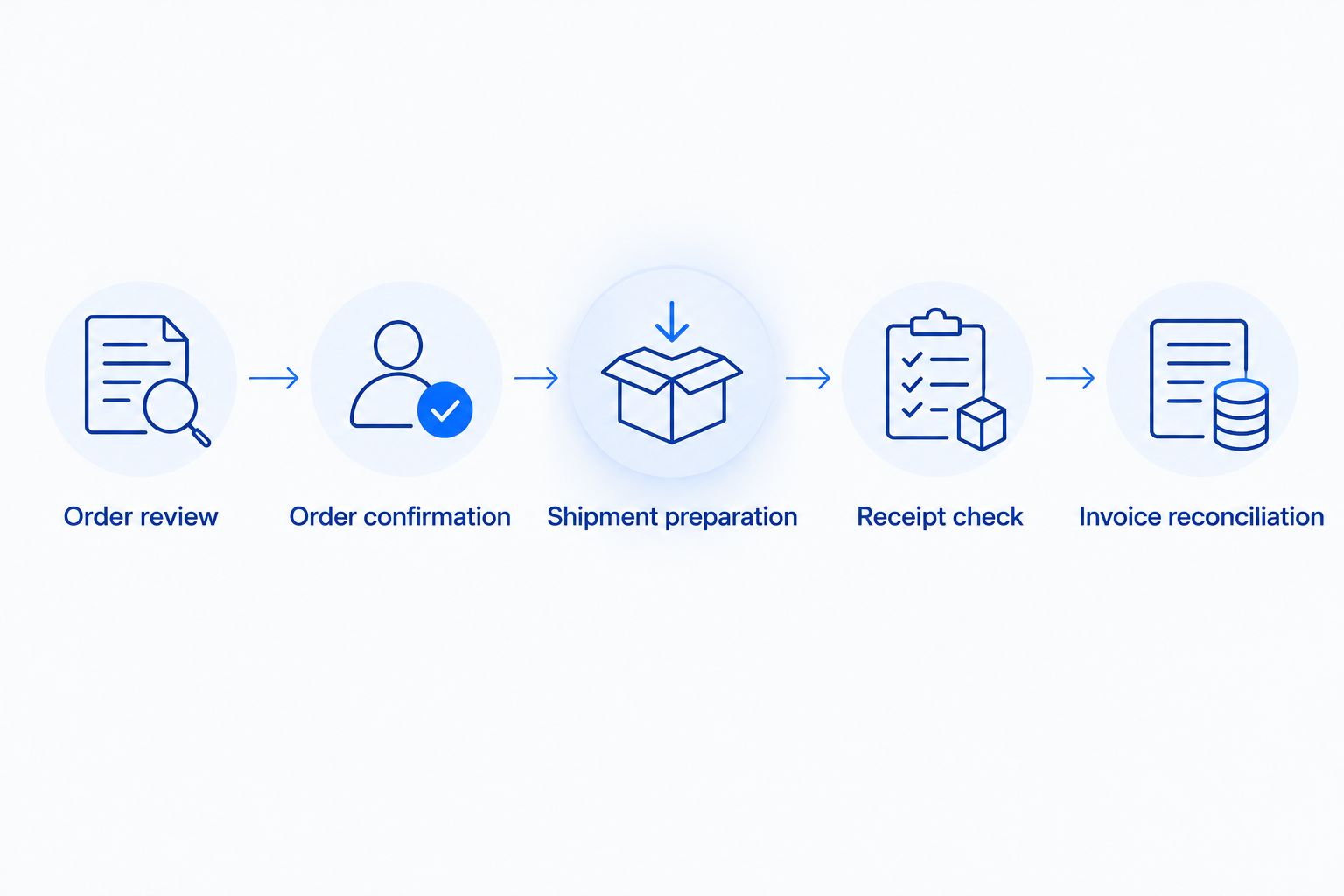
The operational sequence is Order review, Order confirmation, Shipment preparation, Receipt check, and Invoice reconciliation. A handoff fails when its receiving owner lacks the evidence needed to complete the next task.
Do not apply seller fulfillment instructions to vendor shipments. FBA inventory belongs to a different operating process; existing seller inventory does not become vendor inventory through account setup.
Advertising and reporting configuration
Advertising continuity requires deliberate account and product checks. The same product detail page does not guarantee identical campaign access or reporting.
- Record the seller baseline. Export the relevant sales, inventory, and campaign reports before changing activity. Record marketplace, reporting period, currency, and advertising account alongside each file.
- Build the vendor reporting view. Separate purchase orders, shipments, receipts, invoices, deductions, retail performance, and advertising. Supplier shipments and shopper purchases answer different business questions.
- Check campaign eligibility. In Campaign Manager, confirm the intended account and eligible products. Verify the promoted retail offer before committing advertising expenditure.
- Rebuild deliberately. Use existing search-term learnings and creative records to inform setup. Do not describe a new campaign as carrying over the original campaign’s performance history.
- Assign budget ownership. If seller and vendor advertising coexist, name the owner for each account and define product-level objectives. Review overlap before approving additional activity.
Expected result: Your advertising supports the intended offer, and finance can distinguish seller sales from vendor financial activity without combining incompatible measures.
For 2026 reporting, label every dashboard by operating model. Advertising-attributed sales, retail sales, supplier invoices, and cash receipts are not interchangeable revenue measures.
Atlisco’s Amazon PPC management and listing SEO address the growth side of this handoff. Keep supplier compliance and invoice approval with the teams authorized to make those decisions.
Variant: keep Seller Central alongside Vendor Central
A hybrid model is an adjacent workflow, not a requirement. Use it when your approved account arrangements and product strategy support both seller and supplier operations.
- Assign products: Record which ASINs operate through the seller model, vendor model, or both. Document the business reason for each assignment.
- Separate inventory: Reserve stock by operating model so a supplier commitment does not depend on units already allocated to seller fulfillment.
- Separate advertising: Define account ownership, product coverage, and campaign objectives. Review overlapping campaigns rather than assuming additional expenditure is incremental.
- Separate reporting: Maintain distinct seller and supplier financial views, then consolidate them under finance-approved definitions.
Best for: Brands with a clear product-level reason to retain both models. The benefit is operating flexibility; the drawback is additional reconciliation and coordination.
During the 2026 handoff, do not close Seller Central merely because Vendor Central access is active. First resolve existing inventory, open orders, account obligations, and any remaining seller responsibilities.
Troubleshooting
Vendor access exists, but no purchase order arrives
Account activation is not a purchasing commitment. Confirm product setup and onboarding status with the assigned Amazon contact, then verify whether purchasing has been authorized for the relevant items. Do not dispatch an unsolicited shipment.
The product appears under the wrong catalog identity
Compare the submitted product identifier, packaging configuration, and ASIN crosswalk with the intended retail item. Correct the mapping through the relevant support process. Do not create another listing as a workaround for an unresolved identity problem.
A shipment creates a receipt discrepancy or deduction
Match the purchase order, confirmation, shipment notice, labels, carrier evidence, and receipt record. Establish whether the issue concerns documentation, quantity, routing, or packaging, then use the applicable dispute procedure. Preserve the evidence before changing warehouse instructions.
An existing campaign cannot advertise the intended product
Check the advertising account, permissions, product eligibility, and retail offer. A shared ASIN does not guarantee that a seller campaign can serve the vendor objective. Configure activity in the correct account after resolving eligibility.
Revenue looks stronger, but financial results deteriorate
Separate retail sales from supplier invoices and cash receipts. Reconcile deductions, returns, logistics expenses, and advertising against the correct reporting period. Do not scale a vendor relationship using a dashboard that mixes incompatible revenue definitions.
Customize your workflow
Expand only after the pilot closes operationally and financially. Add products or marketplaces with their own catalog mappings, supplier requirements, advertising ownership, and reporting definitions.
Use the same acceptance record for every expansion. A successful shipment in one marketplace does not establish compliance in another, and a working campaign does not establish supplier profitability.
Atlisco’s full-service growth partnerships fit established brands coordinating PPC management and listing SEO across their Amazon growth plan. The advantage is joined-up growth work; the boundary is that commercial approval and supplier obligations remain distinct responsibilities.
Plan your Amazon growth handoff
Align PPC management and listing SEO with your brand’s seller and vendor growth priorities.
FAQ
Can I switch Seller Central to Vendor Central myself?
No. Vendor Central requires an invitation from Amazon, and there is no general Seller Central account-conversion setting. Complete the invited supplier onboarding process while separately managing existing seller obligations.
Is Vendor Central better than Seller Central?
Neither model is automatically better. Seller Central supports direct seller-offer management, while Vendor Central establishes a wholesale relationship with Amazon. Compare the agreed economics and operating responsibilities before choosing.
Can I keep Seller Central and Vendor Central at the same time?
A hybrid operating model exists, but it requires arrangements that support both accounts. Assign inventory, catalog contributions, advertising, and reporting explicitly so the two models do not create conflicting responsibilities.
Will my ASINs change during the transition?
Changing the operating model does not itself require a new ASIN for an unchanged product. Match the existing product identity during vendor setup and investigate identifier or packaging differences before creating another catalog entry.
Does FBA inventory automatically move to Vendor Central?
No. Seller fulfillment inventory and vendor purchase-order shipments are separate operating processes. Resolve existing seller inventory under the applicable seller procedures and prepare vendor shipments against the assigned supplier requirements.
Do Amazon advertising campaigns transfer automatically?
Do not assume that seller campaigns, permissions, or performance history transfer into a vendor advertising account. Verify the intended Amazon Ads account, product eligibility, and campaign setup before changing expenditure.
What should I test before completing the transition?
Test the complete chain from approved product mapping through purchase-order confirmation, compliant shipment, recorded receipt, and financial reconciliation. Keep seller operations intact until the relevant obligations and acceptance checks are resolved.
One last thing
The first successful vendor shipment is not the finish line; the reconciled financial outcome is. A warehouse dispatch proves movement of goods, not the profitability of the supplier relationship.
Keep the pilot open until finance can explain the invoice, deductions, receipt differences, and advertising allocation. That is the specific check that stops an apparently successful transition from hiding an unresolved operating problem.