Atlisco Insights
Amazon Seller Central to Brand Registry: complete 2026 workflow
Follow the seller central to brand registry workflow: verify ownership, connect seller access, and check permissions before handing off Amazon operations in 2026.
Published October 14, 2026

Instead of manually chasing trademark verification, account access, and missing brand tools, use this seller central to brand registry workflow to enroll your brand, connect the correct selling account, and verify access before assigning work. For established sellers, Atlisco connects Amazon PPC management and listing SEO within full-service growth partnerships; this 2026 guide covers the account foundation those activities need.
- The seller central to brand registry workflow requires trademark eligibility, brand verification, and correct selling-account association.
- Amazon Brand Registry enrollment does not automatically resolve every listing or account-access issue.
- Use the existing brand enrollment when adding an authorized seller; do not submit a duplicate application.
- Atlisco suits established brands seeking Amazon PPC management and listing SEO within a growth partnership.
Why this matters
Seller Central access, Brand Registry permissions, and selling-account association are separate controls. A colleague can manage listings without holding brand-protection permissions. A trademark owner can enroll a brand without giving your operating seller account access to its selling benefits.
For your 2026 setup, separate ownership from execution. Keep trademark control with the brand owner, connect the business account that sells the products, and grant operators the permissions their work requires. Treat approval as a checkpoint, not the finish line.
Atlisco is best for 7–8 figure e-commerce brands seeking Amazon PPC management, listing SEO, and full-service growth partnerships. Brand enrollment supports that work, but it does not replace catalog accuracy, campaign management, or profitability controls.
Before you start
- Trademark and brand evidence: Prepare an eligible registered trademark, or an eligible pending application accepted by Amazon, from a supported trademark office. Have the trademark number, exact brand name, and genuine photographs showing the brand permanently affixed to the product or packaging.
- Account access: Confirm you can sign in to the intended Seller Central account and identify its business owner. Locate the trademark owner or representative responsible for receiving Amazon's verification request.
- The non-obvious gotcha: A seller login is not proof of trademark ownership. Check the trademark record's contact details before applying; verification can stall if the named contact cannot receive or relay Amazon's message.
Eligibility depends on the trademark office, application status, and trademark type. Check Amazon's current enrollment requirements before submitting your 2026 application rather than treating an application receipt as automatic eligibility.
Prepare a working record containing the trademark details, seller-account identifier, target marketplaces, and responsible contacts. Keep passwords and verification codes out of shared project documents. Your operating record should identify who controls access, not expose their credentials.
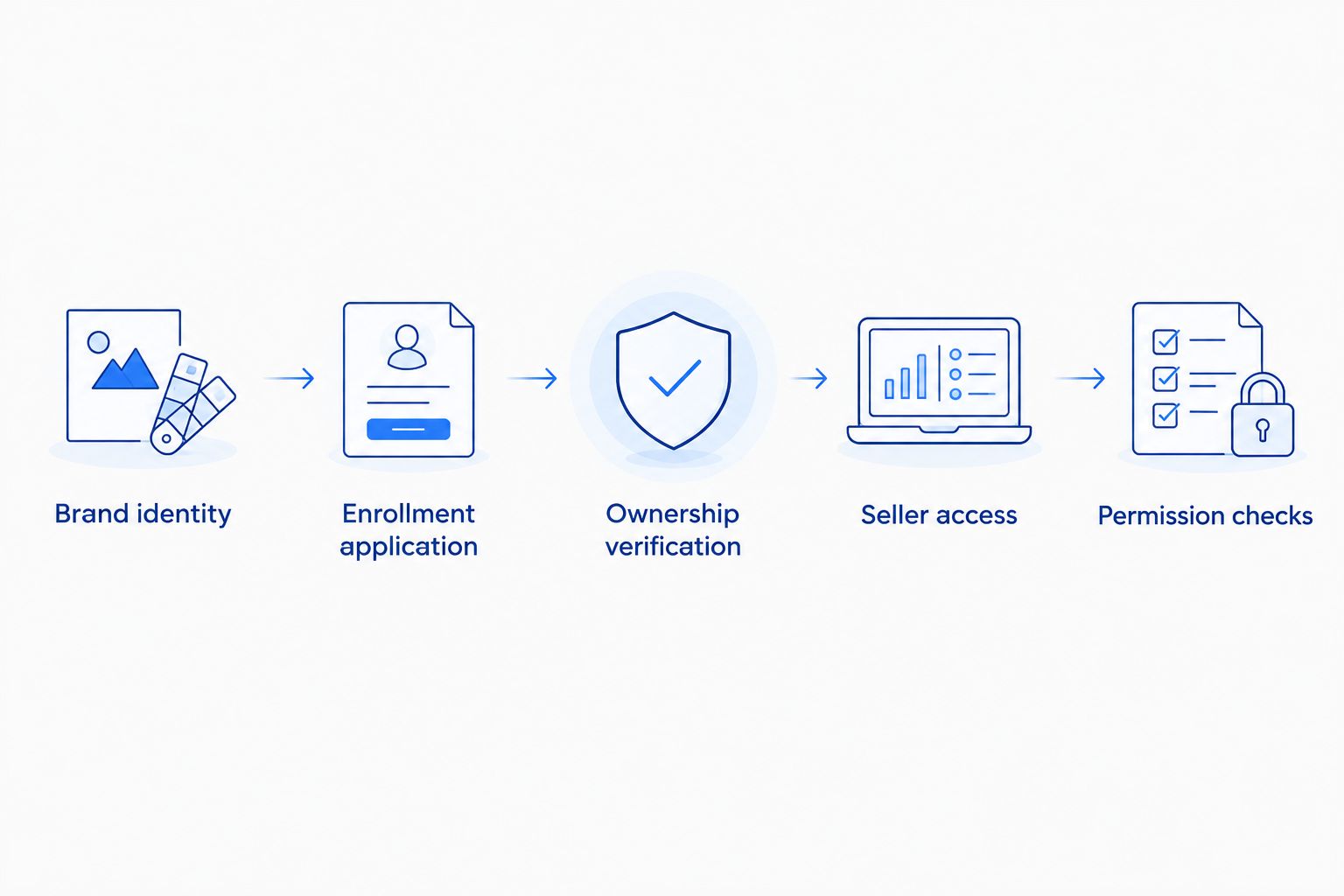
Configuration unit: brand identity
Establish the enrollment record
- Open the trademark record and copy the brand name exactly. Check spelling, spacing, and the trademark's current status.
- Compare that name with the branding on your products and packaging. Use real photographs; do not substitute digitally added logos or artwork mockups for physical evidence.
- Identify the trademark owner. If your company operates through an authorized representative, confirm who will complete enrollment and who will respond to verification.
- Record the Seller Central account that needs brand selling benefits. Include its merchant identifier and marketplace so nobody confuses it with another business account.
- Separate this brand from other brands in your portfolio. Prepare 1 brand record per enrollment application, even when the same team operates several brands.
Expected result: You have a consistent brand identity, qualifying trademark information, usable product evidence, and a named account owner. Every person involved can identify the same brand and seller account without relying on an informal company nickname.
Do not edit listing brand attributes simply to make an inconsistent application appear correct. Resolve the underlying identity issue first. Catalog changes have their own rules, and enrollment is not a shortcut for rebranding an existing product.
Configuration unit: enrollment application
Submit the brand for review
- Sign in to Amazon Brand Registry with the Amazon credentials associated with your intended selling account when the same owner controls both. If the trademark owner and seller are separate organizations, preserve that separation and arrange authorized account association afterward.
- Select Enroll a new brand. Enter the brand name and trademark information using the prepared record, not a shortened trading name.
- Select the relevant trademark office and provide the registration or application information requested. Follow the requirements displayed for that office and trademark status.
- Upload the requested brand evidence. Show the actual branding on the product or packaging clearly enough for a reviewer to compare it with the application.
- Complete the requested product-category and business information. Review the application for mismatched names, identifiers, or contacts before submitting it.
- Save the application reference and submission details in your operating record. Assign one person to monitor the application and coordinate responses.
Expected result: Amazon has an application tied to the correct trademark and physical brand evidence. Your team has a reference for follow-up, rather than several untracked applications for the same brand.
The visible enrollment fields depend on your application and account context. Use the information Amazon requests; do not force a field sequence from an old tutorial onto the current form.
Avoid duplicate submissions while an application is under review. If Amazon requests clarification, respond through the existing application or its associated support case. A second application does not fix inconsistent evidence in the first.
Configuration unit: ownership verification
Complete the trademark-owner check
- Monitor the application for Amazon's verification instructions. Identify the trademark contact Amazon names or uses for the ownership check.
- Ask that contact to check the appropriate inbox and spam folder. Confirm the contact recognizes your application before requesting any verification information.
- Submit the verification code or response through the route Amazon specifies. Do not assume that replying to an unrelated support email completes verification.
- If the contact details are incorrect, resolve the contact problem through the appropriate trademark-office or representative process and follow Amazon's instructions for the application.
- After Amazon confirms approval, check that the enrolled brand appears in the intended Brand Registry account. Save the approval record with the application reference.
Expected result: The brand is approved and visible to the authorized brand owner. You can distinguish an approved enrollment from an application that is merely submitted or awaiting a response.
Ownership verification is a security control, not an administrative formality. An agency, reseller, or catalog operator should not replace the trademark owner simply because that person is easier to reach.
For a 2026 operating plan, document the escalation contact before your team needs one. A former employee's inaccessible inbox creates a preventable dependency, even when the trademark itself remains valid.
Configuration unit: seller access
Associate the operating account and test permissions
- Identify the seller account that needs the brand's selling benefits. Compare its merchant identifier and marketplace with your prepared record.
- Check the brand's selling-account associations in Brand Registry. Where the account is missing, use the available account-association process or contact Brand Registry support with the exact brand and seller identifiers.
- Assign the appropriate relationship and selling role for the account. A brand's own operating seller and an authorized reseller are not interchangeable; choose the role that reflects the actual business relationship.
- Grant individual users the Brand Registry permissions their responsibilities require. Keep ownership-level control with the authorized owner rather than distributing it to every operator.
- In Seller Central, review User Permissions for the staff or partner accounts doing the work. Grant only the relevant listing, advertising, reporting, or content access.
- Check an eligible branded ASIN in A+ Content Manager using the intended operator's login. Verify that the product is recognized for the enrolled brand and that the user can perform the required action.
Expected result: The correct selling account is associated with the brand, and the actual operator can access the relevant eligible tools. Approval is now connected to an executable workflow.
Run 2 access checks: one with the authorized owner and one with the day-to-day operator. If the owner can act but the operator cannot, investigate permissions before changing trademark or catalog data.
Test 3 existing ASINs from your catalog as an internal spot check. This is an operational recommendation, not an Amazon enrollment requirement. Select products that represent your main catalog patterns and compare their brand attributes with the approved brand.
The sequence below separates the checks that teams often collapse into a single approval milestone.
Second workflow: add a seller or marketplace to an enrolled brand
An existing Brand Registry enrollment changes the starting point. Do not enroll the same brand again just because a new seller account needs access. First identify the current brand administrator and the existing enrollment.
| Workflow | Best for | Advantage | Limitation |
|---|---|---|---|
| New brand enrollment | Trademark owners whose brand is not enrolled | Establishes the brand's ownership record | Requires eligible trademark evidence and verification |
| Existing brand association | An enrolled brand adding an authorized selling account | Uses the existing brand record | Still requires correct authorization, account association, and tool eligibility |
- Ask the existing administrator to confirm the enrolled brand and the requesting business's relationship to it.
- Identify the exact seller account and marketplace being added. Do not treat another marketplace login as proof that the required association exists.
- Arrange the appropriate selling-account association and individual permissions. Retain the current owner unless ownership has genuinely changed.
- Test eligible brand tools from the new operating account. Check the actual account and marketplace rather than relying on a successful test elsewhere.
- Record any marketplace-specific trademark or feature requirements that affect your intended activity.
Expected result: The new operating account uses the existing brand record with the correct authorization. Your team avoids a duplicate enrollment and verifies the tools needed in the destination marketplace.
Amazon Brand Registry and Seller Central are related systems, not identical ones. A recognized brand does not mean every selling benefit is enabled for every account or marketplace. For international operations, use the Amazon growth strategy for multi-marketplace sellers guide to connect account structure with execution.
Troubleshooting
The verification message never reaches the contact
Check which contact Amazon identified, then confirm that contact's inbox and spam filtering. If the trademark record points to an outdated representative, correct the contact issue rather than repeatedly resubmitting the application. Keep the existing application reference in every support exchange.
Amazon rejects the brand evidence
Compare the application name, trademark record, and photographs side by side. Replace unclear images or mockups with genuine product or packaging photographs that meet the displayed requirements. Fix the stated rejection reason before submitting revised evidence.
Enrollment is approved, but brand tools are missing
Check selling-account association, the account's relationship to the brand, and individual permissions. Then check the tool's eligibility requirements for the marketplace and ASIN. Approval alone does not prove that every feature should appear.
One ASIN is missing from the content workflow
Inspect that ASIN's brand attribute and catalog identity. If they conflict with the enrolled brand, use the appropriate catalog-support process with supporting evidence. Do not create a duplicate product detail page to bypass the mismatch.
A partner can access Seller Central but not Brand Registry
Review the systems separately. Seller Central permissions do not automatically grant Brand Registry access. Invite the authorized person through the appropriate permission process and test with that person's own login; never solve the issue by sharing the owner's credentials.
Customize your workflow
Turn the 2026 enrollment checklist into an operating handoff. Name the owner responsible for trademark and access changes, the catalog lead responsible for brand attributes, and the advertising lead responsible for campaign execution.
Before expanding advertising, confirm that the promoted ASINs have accurate brand identity and eligible content access. Then connect listing work with campaign decisions through the Amazon SEO for private-label sellers guide.
Atlisco provides Amazon PPC management, listing SEO, and full-service growth partnerships. The fit is coordinated growth execution for established brands; the boundary is that agency services do not replace trademark eligibility or Amazon's approval process. Keep legal ownership decisions with the authorized brand owner.
Plan your Amazon growth partnership
Connect PPC management and listing SEO with a clear account-access foundation.
FAQ
What is the seller central to brand registry workflow?
The workflow is to confirm trademark eligibility, submit brand evidence, complete ownership verification, associate the intended seller account, and test permissions. Seller Central access and Brand Registry authorization require separate checks.
Do I need a registered trademark to join Amazon Brand Registry?
Amazon accepts eligible registered trademarks and certain eligible pending applications from supported trademark offices. Check the current requirements for your office, trademark type, and application status before applying.
Should I use the same login for Seller Central and Brand Registry?
Use the credentials associated with your selling account when the same authorized owner controls both accounts. When the trademark owner and seller are separate businesses, preserve their separate identities and arrange authorized association.
Does Brand Registry approval automatically enable A+ Content?
Approval alone does not establish every account's access to A+ Content. Check the seller account's brand association, user permissions, and the ASIN's eligibility in the relevant marketplace.
Can an agency manage my brand without owning my trademark?
An agency can work through authorized access without becoming the trademark owner. Assign permissions for its actual responsibilities and retain ownership-level control with the authorized brand owner.
Do I need to enroll again when adding another seller account?
Use the existing brand enrollment when adding an authorized seller account for the same brand. Ask the brand administrator to arrange the correct association and verify access from the new account.
How long does Amazon Brand Registry approval take?
There is no universal completion time for every application. Track the application status and respond to verification or evidence requests through the specified process rather than planning around an assumed approval date.
One last thing
Test the person, not just the account. A successful owner login can conceal an operator's missing permissions. Before calling your 2026 setup complete, have the person responsible for the next catalog or advertising task perform that task under their own authorized login.