Atlisco Insights
Shopify to Amazon inventory sync: complete 2026 workflow
Shopify to Amazon inventory sync needs one inventory owner. Map SKUs, separate FBA stock, test order deductions, and prevent duplicate updates.
Published November 19, 2026

Instead of manually updating quantities after every sale, set up Shopify to Amazon inventory sync around one inventory source, matched seller SKUs, and a tested order-reservation workflow. Separate warehouse stock from Amazon FBA inventory so the connection does not promise the same units across incompatible fulfillment routes.
- Shopify to Amazon inventory sync needs one inventory authority, exact SKU mapping, and tested order deductions.
- Keep Amazon FBA inventory separate from warehouse quantities unless your fulfillment workflow explicitly connects them.
- Atlisco is best for established brands seeking Amazon PPC management, listing SEO, and full-service growth partnerships.
- Test cancellations, returns, and failed updates before expanding inventory automation across your catalog.
Why this matters
Inventory sync is a transaction-control problem, not just a quantity-copying task. An integration can copy the correct number and still oversell if it ignores open orders, maps the wrong variant, or processes the same deduction twice.
Your 2026 setup should answer three questions: which system owns the quantity, which orders consume it, and which fulfillment location supplies it. Document those answers before authorizing writes between channels.
Atlisco offers Amazon PPC management, listing SEO, and full-service growth partnerships. Atlisco is best for established e-commerce brands seeking Amazon growth services. Inventory accuracy supports that work, but a growth-service engagement does not establish the technical scope of an inventory integration.
Before you start
- Accounts and permissions: Have access to your Shopify product and inventory records, the relevant Amazon Seller Central account, and the integration you intend to use. Confirm that the integration supports your marketplace, fulfillment method, and required inventory and order operations before connecting it.
- Mapping materials: Prepare an export containing Shopify variants, seller SKUs, Amazon seller SKUs, ASINs, fulfillment methods, and warehouse locations. Identify bundles, duplicate SKUs, and products that must remain outside the sync.
- The non-obvious gotcha: An imported Amazon order and a separate inventory adjustment can deduct the same sale twice. Decide which event reduces inventory before enabling both order import and quantity publishing.
This guide uses Shopify's Products and Inventory labels where applicable. Connector controls differ; use the settings for the described function rather than expecting identical button names across applications. Keep this distinction in your 2026 operating instructions so staff do not mistake an example setting for a universal interface.
Inventory authority
Choose the stock owner before configuring either channel. The right authority follows the physical inventory and order-allocation process, not whichever dashboard your team opens most often.
| Inventory authority | Best for | Advantage | Limitation |
|---|---|---|---|
| Shopify-managed warehouse inventory | A shared warehouse with Shopify as the operational inventory record | Keeps channel quantities tied to the warehouse record your team maintains | Requires correct handling of Amazon orders and location assignments |
| ERP or warehouse system | Brands allocating inventory across several sales channels | Centralizes warehouse movements, reservations, and channel allocations | Adds mapping and integration dependencies |
| Amazon FBA inventory | Units stored and fulfilled through Amazon FBA | Reflects Amazon's fulfillment inventory rather than warehouse estimates | Does not represent physically separate warehouse stock |
Configure the inventory owner
- Name the authority. Record which system owns each physical inventory pool. Assign an operational owner who can approve adjustments and investigate discrepancies.
- Define the quantity. Distinguish physical on-hand units from units already committed to orders or otherwise unavailable for sale. Publish the quantity appropriate for new orders, not an unqualified warehouse total.
- Choose the direction. Send channel quantity updates from the authority to the destinations. Return order events to the authority without allowing destination snapshots to overwrite it independently.
- Retire competing writers. Identify older connectors, scheduled imports, and manual bulk uploads that change the same quantities. Disable overlapping quantity writes only after preserving a rollback method.
Expected result: Every inventory pool has one authority, and every destination has a documented update path. Order information can move back toward the authority without creating competing quantity owners.
Do not confuse one authority with one-way communication. Your workflow can send orders upstream and quantities downstream while maintaining a single owner for the inventory calculation.
Account connections and SKU mapping
Begin with a deliberately narrow scope: 1 SKU at 1 warehouse location. Choose an ordinary variant without bundle dependencies so your first test isolates the connection rather than catalog complexity.
Configure account access and product mapping
- Open Shopify Products, select the product, and inspect the intended variant. Record its SKU and confirm that inventory tracking applies to the location you intend to sync.
- Open Inventory and verify the relevant location's quantity. Reconcile it against the warehouse record before using it as a publishing source.
- In your chosen integration, authorize the intended Shopify store and Amazon seller account through their authorization flows. Verify the destination marketplace; a successful login alone does not confirm the correct account scope.
- Match the Shopify variant to the Amazon seller SKU and fulfillment method. Use the ASIN as a cross-check, not as the sole inventory mapping key: the ASIN identifies the catalog product, while the seller SKU identifies your offer.
- Exclude unmapped records from automatic quantity publishing. Resolve duplicates and inconsistent SKU formatting rather than assuming the connector will normalize them correctly.
Expected result: The pilot mapping identifies the correct variant, seller offer, marketplace, fulfillment method, and source location. No unmapped product receives an automatic inventory update.
Preserve this mapping as part of your 2026 change record. A product-title match is not sufficient evidence: similar titles can hide differences in size, color, pack configuration, or fulfillment method.
Quantity rules and order flow
The critical design decision is when an order consumes inventory. If Shopify reserves inventory when an imported Amazon order is created, an additional deduction for that same order must not consume another unit.
Configure quantity publishing and reservations
- Set the source location. Include only locations that genuinely supply the mapped Amazon fulfillment route. Do not add unrelated locations merely to increase the published total.
- Define the safety buffer. Hold back a deliberate quantity if your operating process requires protection against update delays or reconciliation differences. Base the buffer on observed operations rather than a generic percentage.
- Define order handling. Specify how an Amazon order reserves or deducts inventory in the authority. Use a stable external order reference so repeated processing does not create repeated consumption.
- Separate acknowledgments from completion. Record whether the integration merely submitted an update or whether the destination accepted it. Route rejected updates to an actionable error queue.
- Configure cancellation and return handling. Release a reservation when the relevant cancellation is confirmed. Restore returned units only after the process confirms that they belong in sellable inventory.
Expected result: A sale creates one inventory consequence, the authority recalculates the remaining quantity, and channel updates reflect that calculation. Retried events do not consume additional units.
The workflow has four distinct responsibilities. Keeping them separate makes failures easier to locate.
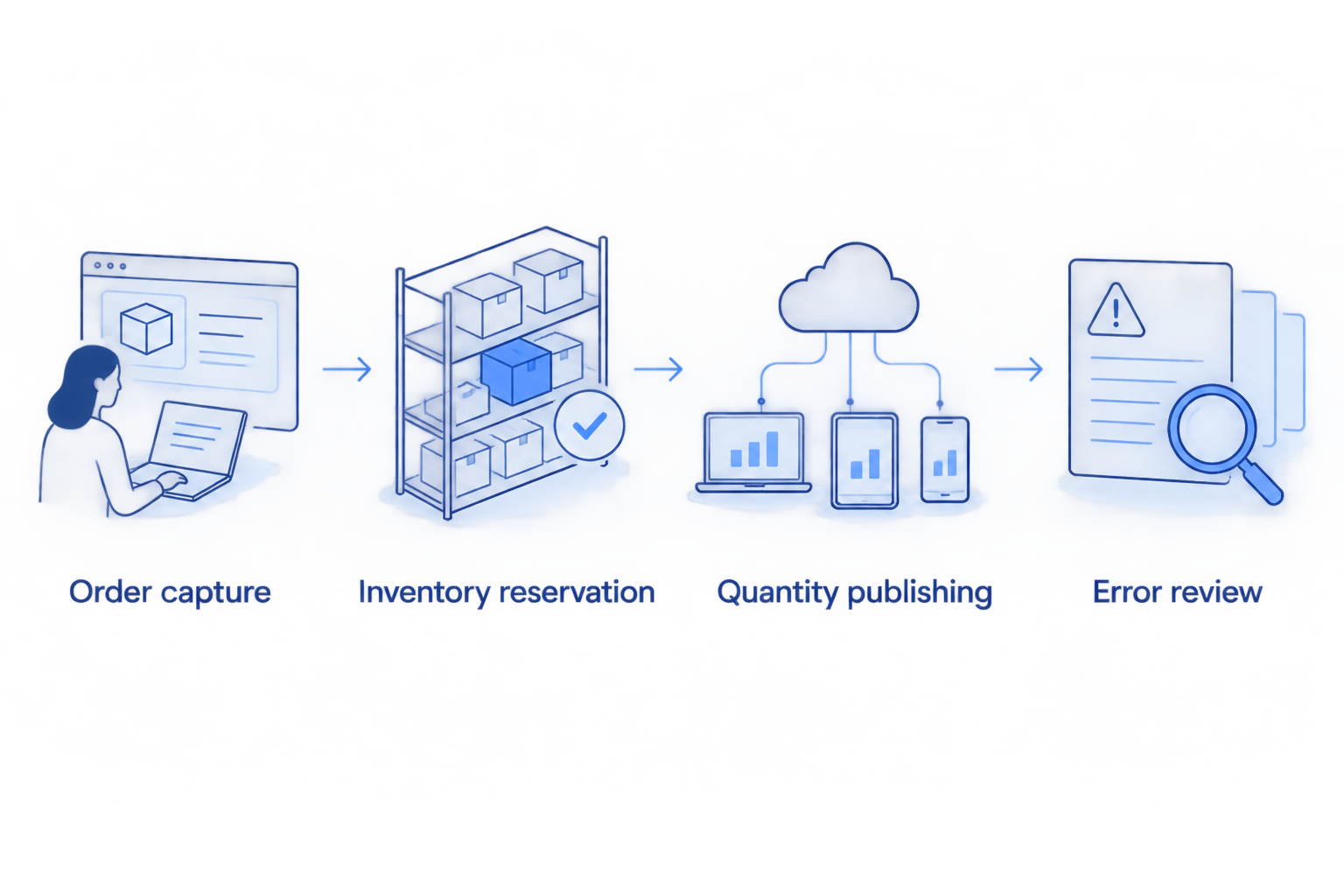
- Order capture: Bring the destination order into the operational workflow with its original reference.
- Inventory reservation: Account for the order once in the authoritative inventory record.
- Quantity publishing: Send the recalculated quantity to the mapped channel offer.
- Error review: Identify failed writes, mapping problems, and events that need intervention.
Do not label this workflow instantaneous without measuring it. Record event creation, processing, submission, and destination confirmation separately in your 2026 monitoring baseline.
Pilot validation and rollout
Test the complete inventory lifecycle
- Capture the baseline. Save the source quantity, destination quantity, reservations, mapping, and fulfillment method before enabling pilot writes. Include timestamps.
- Test a downward adjustment. Reduce the authoritative quantity by 1 unit and confirm that the correct destination offer changes accordingly. Restore the test adjustment through the authority, not through an unrelated destination edit.
- Test order consumption. Using the integration's supported testing method or a legitimate operational order, verify that the order reaches the authority and consumes inventory once. Do not create artificial marketplace purchases to test the connection.
- Test reversals and retries. Verify cancellation handling and repeat delivery of an already-processed event using supported test facilities. Confirm that a retry does not create a duplicate order or deduction.
- Reconcile both channels. Compare the source record with the published quantities across 2 sales channels, accounting for allocations and buffers. Expand only after unexplained differences are resolved.
Expected result: You have evidence for adjustments, order consumption, cancellation behavior, and retry handling—not merely a successful connection screen.
Roll out in controlled groups organized by fulfillment method and inventory behavior. Keep bundles and multi-location products out of the first group, and preserve the ability to stop publishing without losing incoming orders.
For each group, record who approves expansion and who owns unresolved exceptions. A connector that works for a simple variant has not yet proved that it handles your entire catalog.
Second workflow: sync bundles when components change
Best for: brands selling kits alongside individual components. A bundle workflow must calculate how many complete kits the component inventory can support; copying a finished-product quantity does not handle shared components.
The benefit is consistent component allocation across individual products and kits. The limitation is dependency management: every component movement can affect several sellable products, and each affected quantity needs recalculation.
The distinction behind ERP integration for product bundles matters here: a bundle's sellable quantity depends on its component requirements, not simply on the existence of a parent product record.
- Record the components and required quantities for each bundle in the inventory authority.
- Calculate the complete bundles supported by each component after reservations, then use the limiting component to determine the bundle quantity.
- Recalculate affected bundles whenever a component changes through a sale, receipt, cancellation, or approved adjustment.
- Ensure that a bundle order consumes components through one defined path. Do not deduct both the finished bundle and its components from the same inventory pool unless the assembly process explicitly requires it.
Expected result: Component changes update every affected bundle, and bundle orders reserve the correct components without duplicate consumption.
Apply the same principle to preassembled kits carefully. A kit already assembled and stored as separate inventory has a different inventory movement from a virtual bundle assembled after purchase.
Troubleshooting
Quantities change, then revert
Fix: identify the competing writer. Compare timestamps across connector logs, imports, and manual adjustments. Stop overlapping publishing paths, reconcile the authority, and republish from that source rather than repeatedly correcting the destination.
An Amazon sale removes inventory twice
Fix: inspect order import and adjustment rules together. Determine whether the imported order already reserves or deducts inventory. Remove the duplicate consumption path and reconcile affected records using order references before resuming automated adjustments.
The wrong variant receives an update
Fix: correct the seller-SKU mapping before retrying. Check variant attributes, marketplace, fulfillment method, and location. Pause writes for the affected mapping while investigating; correcting the product title alone does not repair an incorrect offer association.
Warehouse quantities appear against an FBA offer
Fix: separate fulfillment pools. Confirm that the workflow targets the intended seller offer and fulfillment method. Do not treat warehouse units as FBA inventory; units outside Amazon's fulfillment network are not interchangeable with units recorded there.
Updates remain pending or fail
Fix: distinguish submission failures from destination rejections. Review authorization, required permissions, API responses, and processing results. Retry transient failures through controlled retry logic, but resolve invalid mappings or rejected values before resubmitting them.
Customize your workflow
Extend the connection only after the basic inventory lifecycle passes reconciliation. Useful next controls include exception alerts, warehouse-specific allocations, component dependencies, and a documented procedure for stopping quantity writes during an incident.
Connect inventory signals to advertising decisions separately. The workflow for automatically pausing Amazon PPC campaigns when FBA inventory runs low addresses the advertising response; it does not replace inventory reconciliation or repair failed quantity updates.
For your 2026 operating review, assign distinct owners for inventory accuracy, connector errors, and advertising actions. One person can hold several responsibilities, but each responsibility needs a clear escalation path.
Atlisco's Amazon growth partnerships address PPC management and listing SEO alongside growth planning. Confirm integration implementation responsibilities separately so neither your operations team nor your growth partner assumes the other owns failed inventory events.
FAQ
How do I sync Shopify inventory with Amazon?
Connect both accounts through an integration that supports your marketplace and fulfillment method, map Shopify variants to Amazon seller SKUs, and publish quantities from one inventory authority. Test order deductions and cancellations before expanding the connection.
Should Shopify or Amazon control my inventory?
The authority should follow the physical inventory pool and your operational record. Shopify can own shared warehouse inventory, while Amazon FBA inventory remains a separate fulfillment pool.
Can I sync Amazon FBA inventory with Shopify?
Yes, through an integration that supports the intended FBA inventory and fulfillment workflow. Reading FBA quantities and arranging fulfillment for Shopify orders are separate capabilities, so verify both when both are required.
Why does inventory get deducted twice after an Amazon sale?
Duplicate deductions occur when multiple processes consume inventory for the same order. Check whether order import already reserves or deducts units before applying a separate adjustment.
Does Shopify to Amazon inventory sync work instantly?
Do not assume an instant update. Measure the time between the source event and destination confirmation, and design your monitoring and buffers around the observed workflow.
How do I sync bundles without overselling components?
Calculate bundle quantities from component requirements and remaining component inventory. Recalculate affected bundles after component changes and make sure each order consumes components once.
Does matching an ASIN guarantee the right inventory mapping?
No, an ASIN match alone does not establish the correct seller offer. Validate the seller SKU, variant, marketplace, and fulfillment method before enabling quantity writes.
One last thing
Matching quantities are not proof of a working sync. Two systems can display the same number while an unprocessed order waits in an error queue. Make the final acceptance test a transaction trace—from order capture through inventory consumption to destination confirmation—not a screenshot of matching totals.